

The most detailed monitoring system may be the wrong fit for your team. Workforce performance tracking tools generally serve three purposes: recording time and activity, managing goals and KPIs, or organising tasks and project progress. The right choice depends on what you need to measure and how the information will guide decisions.
Cost matters, but it only tells you so much without considering analytics, reporting depth, and fit with your team’s work. A system built to log activity answers a different operational question from one designed to track outcomes, feedback, and performance trends. Comparing these capabilities helps Indian businesses focus on their requirements rather than feature volume alone.
This comparison covers cost considerations, analytics, productivity reports, and intended use. You’ll see which criteria matter for different teams, how to assess the value of the data, and how to narrow the options to a practical fit.
Key Takeaways
- Match the tool’s core function to the decision you need to make, whether that concerns time, goals, or task progress.
- Assess total cost alongside reporting depth, team size, and the capabilities your workflow actually requires.
- Use analytics to identify patterns in performance and workload, not just to collect activity data.
- Compare tools against a consistent set of criteria to find a practical fit for your team.
Ready to Pick the Best Employee Monitoring and Tracking Software?
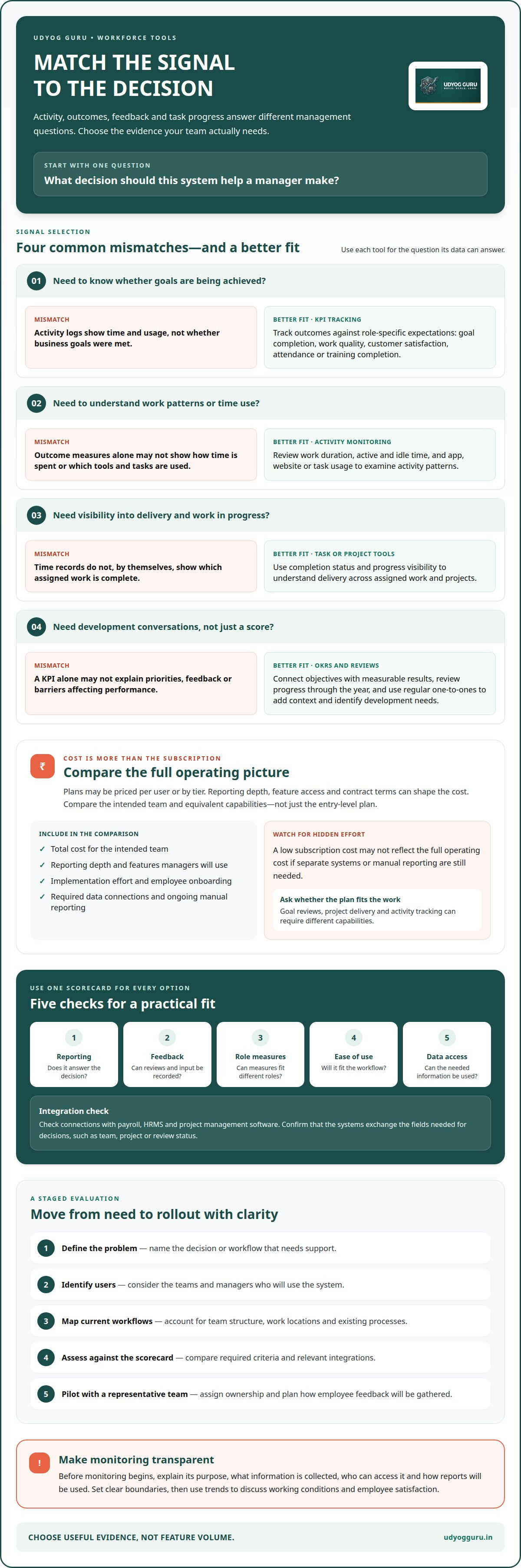
Start by identifying the decision the system must support: measuring outcomes, examining activity, or guiding development. Each option captures different signals, so compare the evidence it gathers and the purpose of its reports before selecting it.
Employee Performance KPIs
KPIs quantify progress against business goals through measures such as goal completion, work quality, customer satisfaction, attendance, and training completion. For a social media role, a SMART goal could target a 10% increase in channel engagement per quarter by year-end. Unlike activity monitoring, KPI tracking evaluates results against defined expectations, making role-specific measures essential.
Monitoring and Productivity Tracking Tools
Monitoring tools can record work duration, including active and idle time, and track the apps, websites, or tasks used during the day. Time-tracking tools help employees see where work hours go, while task and project tools show assigned work and completion progress. The key distinction is the signal: activity patterns rather than goal outcomes.
Reviews, OKRs, and Employee Development
OKRs connect objectives with measurable results, while performance reviews assess progress and identify development needs. Managers can track performance throughout the year rather than relying only on an annual review. Standardised forms and rating scales support consistent evaluations, while regular one-to-one meetings add context about priorities, feedback, and barriers a KPI alone cannot explain.
Transparent Monitoring for Employees
Before introducing monitoring, explain its purpose, what information is collected, and how managers will use it. Tell employees whether the system records work duration, app use, or task progress. Clear boundaries distinguish productivity analysis from intrusive oversight. Disclose the process before monitoring begins, then use trends to discuss working conditions and employee satisfaction.
| Option | Primary signal | Best suited to |
|---|---|---|
| KPI tracking | Outcomes | Goal progress |
| Activity monitoring | Time and usage | Work patterns |
| OKRs and reviews | Goals and feedback | Development |
| Task or project tools | Completion status | Delivery visibility |
Choose the option whose data matches the decision managers need to make.
Choosing monitoring software and evaluating costs
Choose software by linking its data to a defined management decision. For an Indian business, the right fit depends on workflows, team structure, reporting needs, and integration requirements.
Performance Management Software Pricing
Performance management software may use per-user subscriptions or tiered plans, with costs shaped by reporting depth, feature access, and contract terms. Compare the total cost for the intended team, not just the entry-level plan. A remote team managing goal reviews may need different capabilities from a hybrid team measuring project delivery. Focus on the functions managers will actually use.
Budget planning should also account for implementation effort, employee onboarding, and required data connections. A low subscription cost may not reflect the full operating cost if separate systems or manual reporting are still needed. Compare equivalent capabilities across plans before making a cost-based decision.
Software Evaluation Criteria
Evaluate each option against the same scorecard: reporting, feedback workflows, role-based measures, ease of use, and data access. A project team may need completion trends, while a people manager may prioritise review records and development conversations. These criteria distinguish performance management software from activity-monitoring products, which capture different operational signals.
Integration is another key test. Connections with payroll, HRMS, and project management software can reduce duplicate entry by aligning employee records, work data, and reporting. Confirm that systems exchange the specific fields needed for decisions, such as team, project, or review status.
Choosing and Implementing a Tracking Tool
Indian businesses can take a staged approach: define the problem, identify users, map current workflows, assess software against required criteria, then pilot it with a representative team. Hybrid or remote teams may need consistent reporting across work locations, while project teams may prioritise task visibility. Assign implementation ownership and plan how to gather employee feedback before rollout.
Explain the purpose, data collected, access, and reporting process to employees before launch. Then review whether the tool produces useful decisions without adding unnecessary administrative steps. For teams needing a structured workforce assessment, Workforce X-Ray™ can help diagnose workflow and delegation needs.
Workforce analytics and productivity reporting
Analytics turn work records into evidence about progress, capacity, and outcomes. A useful report helps leaders decide what practical step to take next.
Business Uses of Workforce Analytics
Workforce analytics help leaders examine patterns across teams, roles, and goals. A 9-box grid combines performance and potential ratings to organise development discussions, rather than measuring daily activity. For example, managers can use it to identify employees who need support, expanded responsibilities, or a clearer development plan.
Business uses also include tracking revenue per employee, customer satisfaction, absenteeism, and time to productivity. Gallup estimated the worldwide cost of lost productivity at $10 trillion. That figure frames the scale of the issue; local analytics can help identify where work processes, role clarity, or capacity need attention.
Analytics and Reporting Dashboards
A dashboard brings selected measures together so leaders can monitor progress. A useful view might show goal completion alongside work quality and customer satisfaction, helping managers interpret outcomes together. Different roles need different measures, so one company-wide score can conceal important differences between teams.
Set a reporting cadence and assign an owner to each measure. For example, a team leader could review project completion trends alongside delivery data, then record the decision and follow-up. This links analytics to management action instead of leaving reports as passive records.
Productivity Behaviour Analysis
Productivity behaviour analysis examines how work patterns relate to results. A report might show repeated idle periods, overtime, or delays around a particular task. Before changing processes, managers can compare these signals with workload, project deadlines, and employee feedback. Activity data alone does not explain why a pattern occurred.
Use analysis to investigate workflow conditions, not to label an employee based on one measure. If overtime rises while project delivery slows, leaders can examine task allocation and bottlenecks. Connecting productivity trends with team capacity and culture helps direct conversations toward specific adjustments and follow-up.
Comparing performance tracking tools
No single platform suits every Indian organisation. Compare tools by what they measure, which decision they support, and how well they fit the team’s workflow.
For small businesses, goal and task tracking can provide a focused view without requiring a complex reporting system. Remote teams often need clear task ownership and project progress; large enterprises may need connected analytics, role-specific measures, and structured reviews. Fit depends on operating needs, not company size alone.
| Tool type | Primary measure | Useful for |
|---|---|---|
| KPI tracking | Role outcomes | Performance targets |
| OKR platforms | Objectives and results | Goal alignment |
| Time tracking | Work duration | Time allocation |
| Activity monitoring | App and site use | Work patterns |
| Task management | Task status | Daily coordination |
| Project management | Milestones and delivery | Remote projects |
| Review management | Review records | Performance conversations |
| 360-degree feedback | Multi-source input | Behavioural development |
| Engagement surveys | Employee sentiment | Engagement trends |
| Learning tracking | Training completion | Development plans |
| Analytics dashboards | Combined indicators | Leadership reporting |
| Capacity planning | Workload distribution | Team allocation |
Use the table to shortlist platforms by the measures you need, then assess how their reports support action. A project manager may need milestone visibility, while a people leader may prioritise employee engagement and review history. Don’t treat activity volume as a substitute for quality or outcomes.
Before selection, map each tool to a management decision and identify overlapping functions. That comparison helps managers avoid paying for duplicate reporting or collecting information with no clear operational use. For a structured assessment of workforce needs, map your workforce priorities.
Udyog Guru
Udyog Guru helps businesses connect workforce performance decisions with the structure of their operations. When tracking data reveals unclear responsibilities, workflow friction, or delegation gaps, its Workforce X-Ray™ and Workforce Acceleration Engine™ address workforce optimisation and team performance. Business X-Ray™ (Tier 1) and Business Acceleration Engine™ (Tier 2) support broader business transformation, while the AI Tech Business Integration Bootcamp (Tier 3) focuses on embedding technology and automation into existing workflows.
A structured assessment is useful when buying software alone won’t resolve the underlying process issue. It can help clarify what your team needs to measure and how performance information connects to operational priorities. Udyog Guru’s Workforce X-Ray™ diagnoses workforce performance across five dimensions, helping leaders identify where a more structured system may be needed.
Make the Next Performance Decision Deliberate
The next step is to treat measurement as part of your operating design, not as a standalone software purchase. Before expanding tracking, define which management decision needs better evidence and how that evidence will change a workflow, role, or development conversation.
That discipline keeps workforce performance tracking tools connected to outcomes rather than data collection alone. It also gives employees a clearer view of what is measured and why, while helping leaders assess whether reporting supports useful action. If the diagnosis points to broader workforce or business structure, Udyog Guru’s Business X-Ray™ (Tier 1), Business Acceleration Engine™ (Tier 2), and Workforce X-Ray™ provide relevant paths for examining those needs.
For a practical discussion about aligning workforce measurement with your operating priorities, contact Udyog Guru. A considered next step can turn performance data into a clearer system for decisions and improvement.
Frequently Asked Questions
What Type of Employee Activity Can Be Monitored?
Depending on the system and its settings, employers may monitor work duration, active and idle time, apps, websites, and task activity. A project team might use task status to locate a delivery bottleneck, while a support team might examine response patterns. Choose activity relevant to a work objective, explain how it will be used, and avoid collecting signals that cannot inform a management action.
How Does Employee Monitoring Help Productivity, Performance, and Costs?
Monitoring can make work patterns visible, helping managers investigate delays, uneven workloads, or repeated process interruptions. If a team regularly switches between systems, for example, managers can review the workflow and identify possible process changes. Link cost decisions to a business need, such as capacity planning or software use. Monitoring data alone does not establish the cause of a performance issue.
What Types of Teams Rely on Employee Monitoring?
Teams with measurable workflows may use monitoring to understand work allocation and delivery patterns. Remote support teams can examine task progress across locations, while project teams can track milestones and assigned work. Field operations and design teams may need different indicators. Select measures that reflect each role’s outputs, and pair activity records with context from managers and employees.
What are the top employee performance measurement tools?
The most useful tool type depends on what you need to measure. KPI systems track defined outcomes; review platforms organise feedback; project tools show task and milestone progress; and engagement surveys capture employee sentiment. A customer support team could combine resolution quality with feedback rather than judge performance by activity volume alone. Compare categories by how clearly they support a specific decision.
What are workforce performance tracking tools and how do they work?
Workforce performance tracking tools collect and organise information about work activity, goals, tasks, or employee outcomes. Managers set relevant measures, review reports, and use patterns to guide decisions or follow-up conversations. A team might connect a missed project milestone with task ownership and workload records. The system structures the evidence, but managers still need to interpret it in context.
What are the best workforce performance tracking tools for businesses in India?
The best fit for an Indian business is a tool that matches its team structure, work processes, and reporting needs. A small team may prioritise simple goal and task visibility; a distributed team may need consistent project reporting; a larger organisation may require role-based dashboards and coordinated review records. Compare usability, integration needs, data access, and employee communication before choosing.


