

What if the main obstacle to automate operations without coding isn’t a lack of software, but an unstable process? Repetitive tasks consume staff time, while unclear handoffs and fragmented tools can add delays instead of removing them.
It’s reasonable to want automation without hiring developers or writing code. It’s just as important to avoid creating a system that quietly produces errors or weakens oversight. Start with a workflow that has clear steps, predictable inputs, and defined points for human review.
This practical guide shows you how to assess operations, choose a low-risk workflow, compare no-code tools against its requirements, and build and test an automation with appropriate checks. You’ll also learn how to measure whether it improves reliability, visibility, or operating capacity. The sequence matters: diagnose the process first, then configure the technology, test exceptions, and monitor performance. That way, automation becomes part of your operating system, not another disconnected app.
Key Takeaways
- Understand how no-code workflow automation differs from digitisation, robotic process automation, and generative AI.
- Map inputs, decisions, handoffs, exceptions, and ownership before selecting a tool.
- Compare automation options by integration fit, oversight, data handling, and how they manage exceptions.
- To automate operations without coding, configure one workflow first and test normal cases, missing information, duplicates, and failures before expanding.
- Connect automation to documented processes, workforce responsibilities, and reporting so it supports management rather than becoming another disconnected app.
What Does It Mean to Automate Business Operations Without Coding?
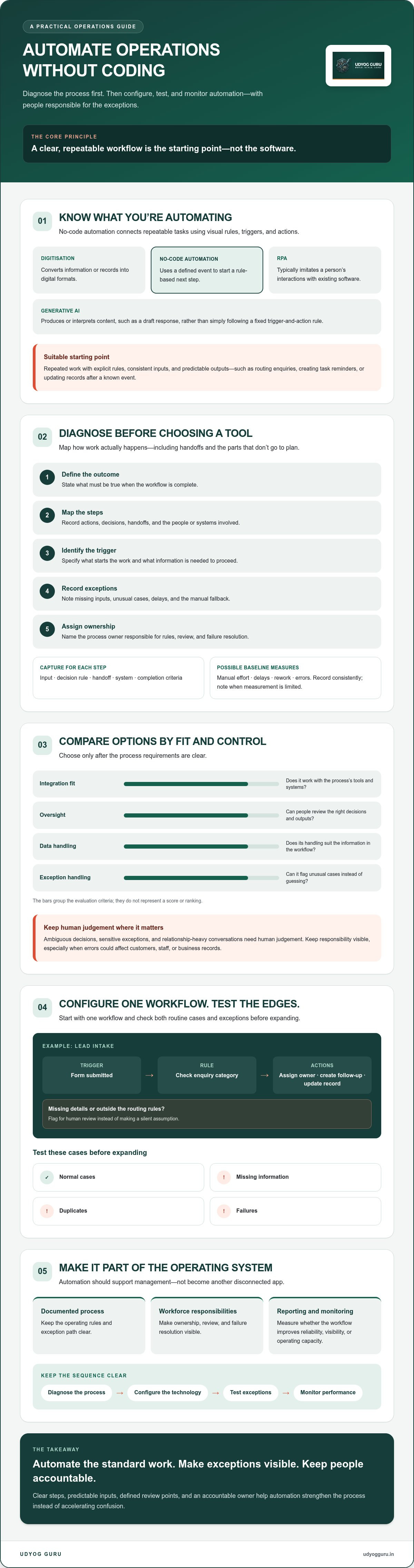
No-code automation connects repeatable business tasks using visual rules, triggers, and actions. A defined event in one step can start the next without custom programming. For example, a form submission can trigger an action such as creating a record, assigning an owner, or sending a notification. A No-code development platform uses a graphical interface to build software or workflows without writing code.
Automation is not the same as digitisation. Digitisation converts information or records into digital formats; automation uses rules to move work forward. Robotic process automation, or RPA, typically imitates a person’s interactions with existing software interfaces. Generative AI produces or interprets content, such as a draft response, rather than simply following a fixed trigger-and-action rule. These approaches can overlap, but they serve different purposes and require different levels of oversight.
Consider a lead-intake process: a prospective customer submits a form, a rule checks the enquiry category, and the workflow assigns it to the appropriate team member. It can then create a follow-up task and update the enquiry record. If key details are missing or the request falls outside the routing rules, the workflow should flag it for human review instead of making a silent assumption. This is a practical way to automate operations without coding while keeping responsibility visible.
Which business tasks are suitable for no-code automation?
Start with work that happens repeatedly, follows explicit rules, and uses consistent inputs to produce predictable outputs. Examples include routing enquiries, creating task reminders, and updating records after a known event. Before choosing a task, ask its process owner how often it occurs and where it tends to stall or fail. A task may seem repetitive while still involving undocumented decisions, so examine what staff actually do rather than automating an assumed process.
What no-code automation cannot reliably replace
Ambiguous decisions, sensitive exceptions, and relationship-heavy conversations require human judgement. A workflow can surface information or prepare a routine next step, but it shouldn’t make consequential decisions without suitable review. The same caution applies when generative AI is involved: generated recommendations or messages need a clear reviewer when errors could affect customers, staff, or business records.
No-code tools connect steps; they don’t resolve unclear ownership, inconsistent rules, or conflicting definitions of completion. If staff handle the same case in different ways, automation can reproduce that inconsistency faster. Establish the operating rule and exception path first. Then automate the parts that are genuinely standard, while keeping people responsible for judgement and oversight.
Diagnose the Workflow Before Choosing a No-Code Automation Tool
Choose a tool only after diagnosing the process. A poorly defined workflow remains unreliable when automated; technology may simply move confusion between people and systems faster. IBM’s overview of how organisations can automate business processes without writing code provides useful context, but the first operational decision is to identify what the process must accomplish and where it currently breaks down.
Use this five-step diagnosis before comparing tools:
- Define the outcome: State what must be true when the workflow is complete, such as a request being reviewed and assigned.
- Map the steps: Record the actions in sequence, including decisions, handoffs, and the people or systems involved.
- Identify the trigger: Specify the event that starts work and the information required to proceed.
- Record exceptions: Note missing inputs, unusual cases, delays, and the manual fallback for each.
- Assign ownership: Name the process owner responsible for the rules, review, and resolution of failures.
Capture the current state, not an idealised version. For each step, document its input, decision rule, handoff, system, and completion criteria. If staff update a record only after someone confirms information, include that dependency in the map. A process owner can also establish a baseline for manual effort, delays, rework, or errors, provided the measure can be recorded consistently. If it can’t be measured reliably, note the limitation rather than inventing a benchmark.
How do you identify a good first automation?
Compare possible tasks by how often they recur, how stable their rules are, how frequently exceptions occur, and how much the process matters to the business. A contained workflow with a clear owner and observable finish is usually easier to test than one spanning multiple departments. Defer high-consequence work until approval controls, exception handling, and recovery steps are documented. This keeps an initial attempt to automate operations without coding within a manageable boundary.
Map triggers, handoffs, and exception paths
Trace what starts each case, which data is needed, who acts next, and what proves the task is complete. Record every handoff between people and existing systems without assuming those systems can connect. For example, a team may move a request from a shared inbox to a spreadsheet before a supervisor reviews it. Document that route, including what happens if information is missing or the supervisor is unavailable. Define the manual fallback before configuring automation.
For a deeper method of documenting and standardising processes, see Business Process Systematization. Once the workflow is clear, Udyog Guru’s AI Tech Business Integration Bootcamp may be relevant for integrating technology into existing workflows.
Compare No-Code Automation Options by Fit, Control, and Risk
The right tool is the one that fits the diagnosed workflow, not the one with the longest feature list. To automate operations without coding, compare how each option handles your existing systems, access permissions, data, exceptions, and human oversight. Capabilities vary by vendor, subscription plan, and configuration, so verify them before committing.
| Option | Setup complexity | Integration fit | Oversight | Data handling | Exception management |
|---|---|---|---|---|---|
| Native app automation | Often simpler for rules within one application | Best suited to tasks contained in that app | Review available activity logs and approval controls | Check permissions and how the app uses or stores data | Confirm what happens when a required field or rule is missing |
| Visual workflow builder | Requires configuring steps, conditions, and connections | Useful for linking applications when the required integrations are supported | Check access control, monitoring, and intervention options | Review data access, transfer, retention, and vendor practices | Design error alerts, alternate routes, and manual recovery |
| AI-assisted workflow | Requires clear instructions, testing, and review design | May help interpret variable inputs or prepare content | Keep people responsible for consequential decisions and exceptions | Verify what information is processed and under what controls | Set boundaries for uncertain outputs and route them for review |
When is a visual workflow builder the better fit?
Consider a visual builder when the process has defined triggers, ordered steps, and predictable outcomes, particularly when work must move between applications. Zapier, Make, and Microsoft Power Automate are examples to evaluate, not endorsements. Before using one, verify current integrations, permissions, data practices, plan limitations, and whether failures can be monitored and recovered.
No-code does not mean no maintenance. Applications change, permissions expire, and business rules evolve. Assign an owner to review workflow performance, manage access, and update documentation. Without that ownership, an automation may keep running after its assumptions are no longer valid.
When should a human review or AI assist remain in the workflow?
Keep human approval for sensitive exceptions, decisions with material consequences, and work requiring contextual or relationship-based judgement. AI can assist when inputs vary, for example by sorting a request or preparing a draft for review, but its output should not be treated as an established fact or an authorised decision.
Human review is a control, not a substitute for sound inputs. Test the source data, routing rules, and edge cases as well as the AI output. If the upstream record is incomplete or the rule is wrong, a reviewer may not catch every downstream error. Select the approach that makes responsibility and recovery clear.
How to Implement and Test a No-Code Automation Safely
Move a workflow into operation in controlled stages, rather than switching from manual work to full automation at once. Configure one process, test its logic, pilot it within a defined boundary, review the evidence, and expand only when its behaviour is understood. This approach helps you automate operations without coding while keeping errors visible and recoverable.
Before launch, name the workflow owner, define who receives failure alerts, document the manual fallback, and set a review cadence. The owner should know how to pause the workflow and what staff should do if it stops or produces an unexpected result. If recurring delays or rework are prompting automation, first review Identifying Operational Bottlenecks in Business to examine where the process is failing.
How should a no-code automation pilot be tested?
Use test records or a controlled environment if the platform supports them. Compare expected and actual results across ordinary cases and deliberately difficult ones. Include:
- Normal inputs with complete information
- Missing or incorrectly formatted data
- Duplicate submissions or records
- Permission failures or unavailable connected systems
- Exceptions that require a person to decide or intervene
Check more than whether the intended action occurred. Confirm that the right record changed, the correct person was notified, and failures generated a useful alert. Record discrepancies and correct the workflow before the pilot proceeds. The process owner should approve the tested behaviour before it affects live operations.
How do you monitor and maintain automated workflows?
During a limited pilot, review available system records for completed runs, failures, exceptions, and manual interventions. Compare these observations with the process baseline where reliable measures exist, such as delay, rework, or manual effort. Decide what warrants investigation and who will respond. Expand only after the owner has reviewed the evidence and confirmed that controls and recovery steps work as intended.
Maintenance is part of the operating design. Reassess the workflow when its rules, source data, user permissions, or connected systems change. Confirm that alerts still reach the right person and that the documented manual route remains usable. Keep a change record so staff can distinguish current instructions from outdated ones. If the automation produces unexpected results, pause it, use the fallback, and investigate before resuming.
For support integrating technology into existing workflows, explore Udyog Guru’s AI Tech Business Integration Bootcamp.
Build Automation Into a Business System, Not a Collection of Apps
Workflow automation can move information between steps, but it can’t define who is accountable, resolve conflicting priorities, or determine whether the work achieved its intended outcome. Treat automation as one layer of the operating system: documented processes establish the rules, workforce responsibilities assign the work, and reporting shows whether the process is functioning as intended.
Before adding another tool, connect these components. A documented workflow should specify what starts work, who owns each decision, how handoffs occur, and what counts as completion. Workforce responsibilities should clarify who monitors exceptions and who can approve changes. Reporting should track useful operational signals, such as incomplete work, repeated exceptions, or delays, using measures the business can record consistently. This structure helps teams automate operations without coding while preserving management oversight.
For a wider view of how technology fits into business planning, see AI Roadmap for SMEs: Systematic Framework for 2026. The central principle is the same: select technology to meet an operating need, rather than treating each app as an independent solution.
When is outside implementation support useful?
Consider structured support when a workflow crosses teams or systems, or when decision rights and process ownership remain unclear. Before engaging, define the scope, responsible owners, data boundaries, and measures that will indicate whether the work is meeting its purpose. Clear parameters help set expectations and distinguish a process-design need from a tool-selection question.
How Udyog Guru approaches business technology integration
Once the process and controls are understood, Udyog Guru’s AI Tech Business Integration Bootcamp may be relevant for integrating technology into existing workflows and automating repetitive tasks without custom software development. It fits within a broader systems approach: diagnose how work currently moves, establish the operating requirements, then integrate technology to support them. The program is not custom software development, and specific tool compatibility should be verified before decisions are made.
If your team needs structured help connecting business workflows with technology, explore structured business technology integration.
Turn a Stable Process Into a Reliable System
Reliable automation starts with a clear operating rule, not a tool. Identify a repeatable workflow, document its inputs, handoffs, exceptions, and ownership, then choose technology that fits the process and its control requirements. Test it with realistic scenarios, keep human review where judgement matters, and monitor performance before expanding.
To automate operations without coding effectively, treat automation as one part of a wider business system. Documented responsibilities and visible measures help tasks move forward without obscuring who remains accountable. Udyog Guru’s AI Tech Business Integration Bootcamp focuses on integrating technology into existing workflows, including automating repetitive tasks without custom software development.
If you need structured support to assess how technology can fit your operations, explore Udyog Guru’s structured technology integration programs. Start with one well-defined workflow, establish the right safeguards, and build from evidence. A measured first step can clarify what to improve next.
Frequently Asked Questions
Can I automate business operations without coding experience?
Yes. Visual no-code tools let business users connect steps by setting triggers, conditions, and actions through graphical interfaces. You’ll still need to understand the process, including what starts it, what information it needs, and what should happen when something goes wrong. Begin with a clearly defined, low-risk task, test it with representative cases, and assign an owner to monitor the workflow after launch.
What is the easiest business process to automate first?
A good first choice is a repetitive task with consistent inputs, stable rules, and an observable outcome. For example, an enquiry form could trigger a task reminder for a team member if the routing rules are clear. Check how often the task occurs and where it currently fails before choosing it. Avoid starting with a process that depends on sensitive decisions or frequent exceptions.
Which no-code automation tool should a small business choose?
Choose based on the workflow and the systems your business already uses, not a tool’s popularity. Check whether it supports the required connections, user permissions, monitoring, exception handling, and data controls. Confirm current plan limits and how the vendor handles business information. Built-in automation may be sufficient for a process contained within one application; cross-application workflows may call for a visual builder.
Is no-code automation secure for business data?
Security depends on the platform, its configuration, the information involved, and who can access the workflow. Before launch, review the vendor’s data practices, permissions, access controls, retention settings, and available activity records. Limit access to what each user and workflow needs, and check how sensitive information is handled before sending it through a tool. Reassess these controls when permissions or connected systems change.
How do I know whether an automation is working correctly?
Define the expected result before launch, then compare it with actual workflow records during testing and a controlled pilot. Check successful completions, failures, exceptions, and cases requiring manual intervention. Test normal inputs as well as missing data, duplicate records, and permission problems. Where reliable baseline measures exist, compare delays, rework, errors, or manual effort before and after. Assign an owner to review results and investigate unexpected outcomes.
Can no-code automation handle exceptions and approvals?
Depending on the tool, workflows can often route cases to a person when information is missing, a rule doesn’t match, or approval is required. Define these paths before configuration: specify who reviews the case, what information they need, and how work continues if automation fails. Keep human approval for consequential decisions and sensitive exceptions. Confirm that alerts and manual fallbacks work during testing.
When should a business use AI instead of rule-based automation?
Use rule-based automation when inputs and decision rules are consistent, such as assigning a task based on a selected category. AI may assist when inputs vary or require interpretation, such as sorting free-text enquiries or preparing a draft response. AI output can be uncertain, so require human review when decisions have meaningful consequences. Test source data and workflow rules as well as generated outputs before relying on the process.


