

What if automation makes a broken process run faster instead of making work easier? Repetitive tasks consume staff time, but if you automate manual business processes before clarifying inconsistent handoffs, you can reproduce the same errors at greater speed. Start by checking how work actually moves, where delays occur, and which decisions require human judgement.
If you’re weighing rules, software integrations, or AI, the choice doesn’t need to be guesswork. The right method depends on how repeatable the process is, which systems are involved, the consequences of an error, and the exceptions employees need to manage. Automation should reduce avoidable effort without removing necessary oversight or adding a new layer of complexity.
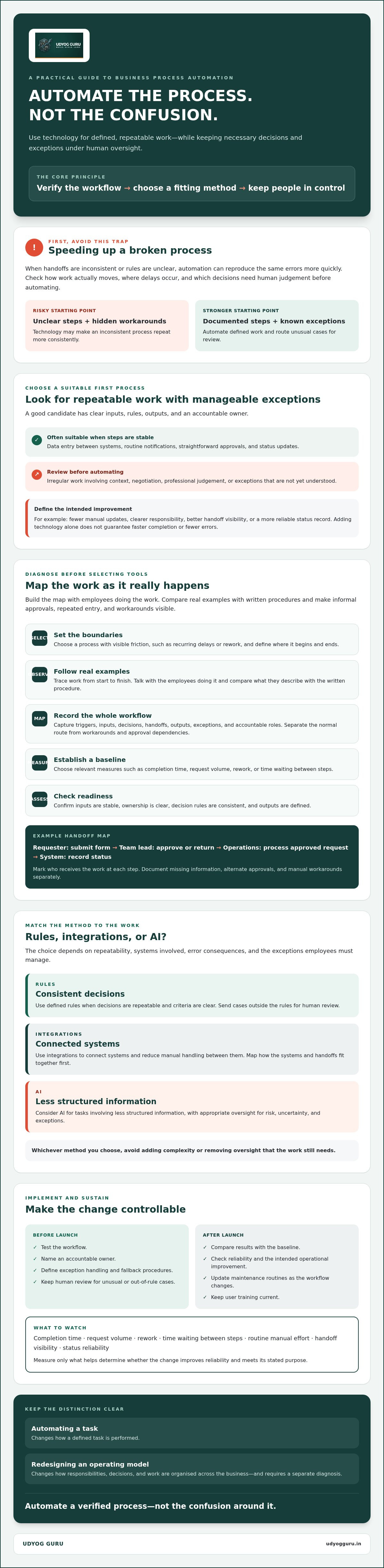
This guide explains how to identify a suitable first process, assess its readiness, and choose an automation approach that fits its risks. You’ll also learn how to set up controls, route exceptions to people, and measure whether the change improves reliability. The principle is straightforward: automate a verified process, not the confusion around it.
Key Takeaways
- Choose a repetitive process with clear steps and manageable exceptions as your first automation candidate.
- Map triggers, inputs, decisions, handoffs, outputs, and ownership before selecting tools.
- Match the method to the work: use rules for consistent decisions, integrations to connect systems, and AI for tasks involving less structured information.
- Automate manual business processes in stages, with testing, a named owner, and clear procedures for exceptions and fallback.
- Track whether the change improves reliability, then update maintenance routines and user training as the workflow evolves.
What Does It Mean to Automate Manual Business Processes?
To automate manual business processes is to use technology to carry out defined, repeatable tasks or handoffs with less manual intervention. The scope can be narrow: a system might route an approved purchase request to the next responsible person and record its status, rather than requiring someone to send a message and update a tracker by hand. For a broader foundation, Business process automation (BPA) describes how technology can support connected business activities.
Process automation uses technology to execute documented, repeatable steps with less manual handling, while keeping appropriate decisions and exceptions under human oversight. It doesn’t automatically redesign the entire operating model or replace employee judgement. Automating one task changes how that task is performed. Redesigning an operating model changes how responsibilities, decisions, and work are organised across the business. The second may be necessary, but it requires a separate diagnosis.
Consider an approved request. A workflow can pass it to the next role, notify the responsible employee, and log whether it is pending or complete. If the request is incomplete, unusual, or outside the approval rules, it should go for review rather than move forward as if it were routine. Automation can reduce repeated handling, but it doesn’t guarantee faster completion or eliminate errors. Poorly defined rules can simply make a flawed step happen consistently.
Which manual tasks are suitable for automation?
Start with work that has clear inputs, rules, outputs, and an accountable owner. Data entry between systems, routine notifications, straightforward approvals, and status updates may be good candidates when the steps are stable and exceptions are understood. Irregular work that depends on context, negotiation, or professional judgement needs process review first. Clarify how employees handle those cases before deciding whether any part can be automated safely.
What should automation improve besides speed?
Check whether a workflow could improve consistency, traceability, handoff visibility, or the time employees spend on routine work. Documented steps make it easier to see who owns each action, where a request is waiting, and what should happen when an exception occurs. These measures also help distinguish a useful change from automation that simply moves work somewhere else.
Before implementation, define the intended result: fewer manual updates, clearer responsibility, or a more reliable record of status. Then compare actual performance with that baseline. This keeps the assessment grounded in operational evidence rather than the assumption that adding technology will fix an unclear process.
Diagnose and Map a Manual Process Before Automating It
Before choosing a tool, establish what the process actually involves. A workflow that looks straightforward in a procedure document may include informal approvals, repeated data entry, or unrecorded workarounds. This diagnostic sequence gives you an evidence-based view of the process before you configure technology to handle it.
- Select: Choose a process with visible friction, such as recurring delays or rework, and define where it begins and ends.
- Observe: Follow real examples from start to finish. Interview the employees doing the work and compare their accounts with written procedures.
- Map: Record every trigger, input, decision, handoff, output, exception, and accountable role. Separate the normal route from workarounds and approval dependencies.
- Measure: Set a baseline using relevant measures, such as completion time, request volume, rework, or time spent waiting between steps.
- Assess readiness: Check whether the process has stable inputs, clear ownership, consistent decision rules, and defined outputs.
How do you map the current workflow accurately?
Build the map with the people who do the work, not only the managers who oversee it. A simple swimlane diagram might show Requester: submit form → Team lead: approve or return → Operations: process approved request → System: record status. Mark each decision point and who receives the work next. Document exceptions separately, including missing information, alternate approvals, and manual workarounds. These often reveal why the official process differs from day-to-day practice.
Use the map to locate bottlenecks before selecting automation. IBM describes business process automation as a way to streamline day-to-day operations, but a reliable design depends on understanding how steps and systems connect. A diagnostic review can help when the cause of recurring delays or rework remains unclear. Udyog Guru’s Business X-Ray™ assessment helps identify operational gaps before you choose a solution.
How can you tell whether a process is ready?
A process is a stronger candidate when employees use consistent inputs, know who owns each step, apply agreed decision rules, and produce a defined output. If the team disagrees about who can approve an exception, required information varies, or records contain unreliable data, resolve those issues first. Otherwise, automation may encode conflicting practices instead of addressing their cause.
Keep the baseline with the process map. After making changes, compare the same measures to see whether the workflow improved, and note which exceptions still need human attention. This evidence helps you decide whether to proceed, refine the process, or pause automation until ownership and rules are clear.
Choose Between Rules, Integrations, and AI for Business Automation
Once the process is clear, choose a method based on how predictable the work is, where its data lives, and how often exceptions occur. The objective isn’t to use the most advanced technology. It’s to select the simplest approach that handles routine steps reliably and keeps people involved where judgement is needed.
| Approach | Suitable tasks | Strengths | Limitations and human review |
|---|---|---|---|
| Rules | Routing requests against clear conditions | Consistent for defined inputs and outcomes | Unclear or changing rules need review; people should handle exceptions. |
| Integrations | Transferring approved information between existing systems | Reduces repeated entry and disconnected handoffs | Depends on compatible systems, permissions, and matching data structures; failed transfers need monitoring. |
| AI | Classifying variable text or summarising language-based inputs | Can assist with information that doesn’t follow a fixed format | Outputs may need verification; people should decide ambiguous or high-impact cases. |
When are rules or system integrations the better fit?
Use rules when the condition and result can be stated plainly, such as sending a complete form to a designated queue or flagging a request that exceeds an established threshold. AI isn’t automatically a better choice for predictable, repeatable tasks. A defined rule is often easier to inspect and maintain.
Choose an integration when information needs to move between systems, such as transferring approved request details into a separate tracking record. Before relying on it, verify that connectors are available, permissions are in place, and fields and formats align. A connection that moves incomplete or mismatched data can create new correction work.
Where can AI assist, and where should people stay involved?
AI may help process variable inputs, such as categorising a message or summarising a written submission, when someone can review the result before it drives a consequential action. Keep people responsible for sensitive decisions, ambiguous cases, and actions with substantial operational impact. Define what the system may suggest, what it may execute, and when it must escalate.
Use this decision sequence: fixed conditions point to rules; moving structured data points to integrations; variable language may justify AI with review. For broader implementation planning, consult an AI roadmap for SMEs as a separate guide. Udyog Guru’s AI Tech Business Integration Bootcamp focuses on integrating technology into existing workflows, with a structured learning and implementation option that doesn’t require custom software development.
Implement Automation in Stages and Measure Whether It Works
A controlled rollout helps you detect faults before they affect the wider operation. Treat implementation as a sequence of review gates, not a single switch from manual work to automation. This approach helps teams automate manual business processes while keeping oversight and recovery procedures clear.
- Define scope: Specify the workflow boundary, intended outcome, accountable process owner, and actions the automation is permitted to perform.
- Configure: Set up the rules or system connections, then document user access, escalation paths, exception handling, and fallback procedures.
- Test: Check normal and unusual scenarios before the workflow is used for live work.
- Pilot: Introduce the automation to a limited part of the process or user group, keeping a manual fallback available where practical.
- Review and expand: Compare results with the baseline, correct issues, and extend use cautiously when controls work as intended.
How should a business test an automated workflow?
Test representative cases, including incomplete inputs, duplicate information, and known exceptions. Verify that outputs are accurate, permissions are appropriate, notifications reach the right people, and records show what happened. Test recovery too: if a connection fails or an action is missed, can the owner identify the issue and resume work without losing the record? During the pilot, make sure employees know when to use the fallback and how to report a fault.
Assign one process owner to coordinate these checks and maintain the operating instructions. The owner should know who can access the workflow, who handles escalations, and who is responsible for resolving exceptions. These controls belong in the design, not on a list of administrative tasks to add after launch.
Which metrics reveal whether automation is effective?
Track measures connected to the original problem. If delays were the concern, monitor cycle time or time waiting between steps. If errors drove the change, track rework and exception volume. Also observe user adoption and unresolved cases. A workflow that appears efficient but is bypassed by employees or leaves exceptions unattended needs further review.
A baseline is the reference point that shows whether automation changed the process, rather than merely changing how its performance is perceived. Where practical, compare equivalent periods or case types, and investigate changes instead of assuming the technology caused them. For guidance on documenting consistent ways of working before and after automation, consult a business process systematization guide.
Udyog Guru’s AI Tech Business Integration Bootcamp focuses on integrating technology into existing workflows.
Build a Sustainable Automation System with Clear Ownership
An automated workflow needs ongoing ownership after implementation. Without it, rules can become outdated, access can remain broader than necessary, and exceptions can pile up without resolution. Assign an accountable process owner who understands the workflow, coordinates changes, and checks whether the automation still supports the intended business outcome. Document the operating rules and maintenance routine so the process doesn’t depend on one person’s memory.
What controls keep an automated process reliable?
Define who can change workflow rules, credentials, and access permissions, and record approved changes. Set review points for failed runs, growing exception patterns, changes to connected systems, and changes in process ownership. Document a manual fallback explaining how to continue work, capture status, and reconcile records when automation is unavailable. These controls support continuity and make responsibility clear.
Maintenance also depends on the employees who use the process. Explain how the workflow changes their responsibilities, train users on the steps they still own, and provide a way to report confusing outcomes or exceptions. Treat that feedback as operational evidence. Repeated workarounds may indicate that a rule needs revision or that the underlying process has changed.
When should a business seek structured implementation support?
A single, stable workflow may be manageable with a clear owner and documented procedures. Consider structured support when bottlenecks remain unresolved or when several processes, teams, and systems interact, making it difficult to identify the right sequence for change. First clarify the business problem and process readiness. Then assess which technology can support the existing workflow and what employees must continue to oversee.
Udyog Guru’s AI Tech Business Integration Bootcamp is a structured learning and implementation option for business owners integrating technology into existing workflows. It focuses on technology integration and workflow automation without requiring custom software development. Assess whether the program’s focus fits your process, team, and implementation needs.
To automate manual business processes sustainably, treat ownership, maintenance, and user feedback as part of the system itself, not as post-launch tasks. Start with a process whose rules and responsibilities are understood, establish the controls it needs, and expand only when the operating model can support the next step. The right next move may be implementation, further diagnosis, or staff training. Choose based on evidence from your workflow.
Make Your Next Automation Decision Evidence-Based
Reliable automation starts with process clarity, not software selection. Map the work as it happens, confirm who owns each step, and establish a baseline before making changes. Then match the method to the task: rules for consistent decisions, integrations for moving information between compatible systems, and AI for variable inputs that people can review.
Roll out changes in stages, test exceptions, and maintain clear ownership, maintenance routines, and fallback procedures. Compare results with your baseline before expanding. These controls help you automate manual business processes without assuming technology alone will resolve unclear responsibilities or inconsistent practices.
For business owners ready to integrate technology into existing workflows, Udyog Guru’s AI Tech Business Integration Bootcamp focuses on technology integration and workflow automation without custom software development. Explore Udyog Guru’s structured technology integration programs to assess whether this learning and implementation option aligns with your process readiness and priorities.
Start with one verified workflow, measure what changes, and use the findings to guide the next improvement. A disciplined first step can create a sounder foundation for the systems that follow.
Frequently Asked Questions
How do I decide which manual business process to automate first?
Start with a process that occurs repeatedly, consumes staff time, and follows steps you can describe clearly. Check that its inputs, decision rules, outputs, and owner are reasonably consistent. Record a baseline, such as completion time, rework, or waiting time, so you can assess the effect later. Avoid starting with a workflow whose cause of delay or responsibility for decisions is still unclear.
Can small businesses automate processes without custom software?
Yes. A small business may be able to use features in its existing tools or connect compatible systems to reduce manual handoffs. The right option depends on the workflow, available integrations, permissions, and data structure. Udyog Guru’s AI Tech Business Integration Bootcamp focuses on teaching business owners to integrate technology and automate workflows without custom software development. Verify that any chosen tool supports the process before relying on it.
What business processes should not be automated?
Don’t automate a process before its rules and responsibilities are understood. Work that is highly irregular, depends on sensitive judgement, or involves ambiguous and high-impact decisions should remain under appropriate human review. You may still automate a clearly defined administrative step within that process, such as routing information, while leaving the decision to a person. First identify exceptions, approval authority, and the consequences of an incorrect action.
Is AI necessary to automate manual business processes?
No. Rules or system integrations may be a better fit for predictable tasks, such as routing a complete form or transferring structured information between compatible systems. AI can assist with variable inputs, including language-based material, but people should review its output when accuracy or consequences matter. Choose the simplest method that meets the process need. The objective is appropriate control and reliable execution, not using AI for its own sake.
How do you measure whether business process automation is working?
Compare results with a baseline recorded before implementation. Choose measures tied to the original problem, such as cycle time, rework, delays, or exception volume. Also monitor user adoption and unresolved cases, since an automated workflow may be bypassed or leave exceptions unattended. Use comparable case types and review results over an appropriate period. If performance changes, investigate the cause before attributing the difference to automation.
What happens if an automated workflow fails?
A failure should trigger a documented response, not leave work stranded. The process owner needs a way to identify failed runs, determine which actions completed, and escalate unresolved cases to the right person. Keep a manual fallback that explains how to continue processing and record status while automation is unavailable. After recovery, reconcile records to prevent missed or duplicate actions, then review the failure and update procedures if needed.
Should a business automate a process before documenting it?
No. First document how the work actually happens, including triggers, inputs, decisions, handoffs, outputs, exceptions, and accountable roles. The record can be concise, but it should reflect real practice rather than an assumed ideal workflow. Compare written procedures with what employees do, then resolve unclear rules or ownership before configuring automation. This reduces the risk of encoding inconsistent workarounds or making an unclear process run faster without addressing its cause.


