

68% of business AI projects exceed their initial budgets by an average of 42%, according to 2026 analyses by Wilco Web Services and AI Dev. The cost of implementing AI in a small business can go well beyond the software subscription when integration, staff training, workflow redesign, and ongoing maintenance are missing from the initial estimate.
Comparing monthly tool fees is a reasonable starting point, but the full budget depends on what the AI needs to connect to, how much the workflow must change, and who will monitor the system after launch. To keep investment focused, start with a measurable bottleneck rather than adding technology without a defined purpose.
This guide breaks down the main cost categories, compares off-the-shelf tools, automation platforms, and guided integration, and outlines a staged way to budget and assess a pilot. It also explains how diagnosing a workflow can help identify a suitable first use case before technical complexity grows. Udyog Guru’s AI Tech Business Integration Bootcamp provides a structured path for embedding AI into existing workflows without custom software development.
Key Takeaways
- Assess the full cost of implementing AI in a small business by accounting for tools, setup, workflow changes, staff training, oversight, and maintenance.
- Use task frequency, error impact, data quality, and system connections to determine the right scope for an AI use case.
- Compare existing AI tools, no-code automation, guided implementation, and custom development by the effort and ongoing ownership each requires.
- Test one bounded workflow: document its baseline, estimate costs, run a pilot, and review time saved, errors, throughput, and team adoption.
- Diagnose the process before choosing technology. Guided integration can help embed AI into existing workflows without custom software development.
What Does the Cost of Implementing AI in a Small Business Actually Include?
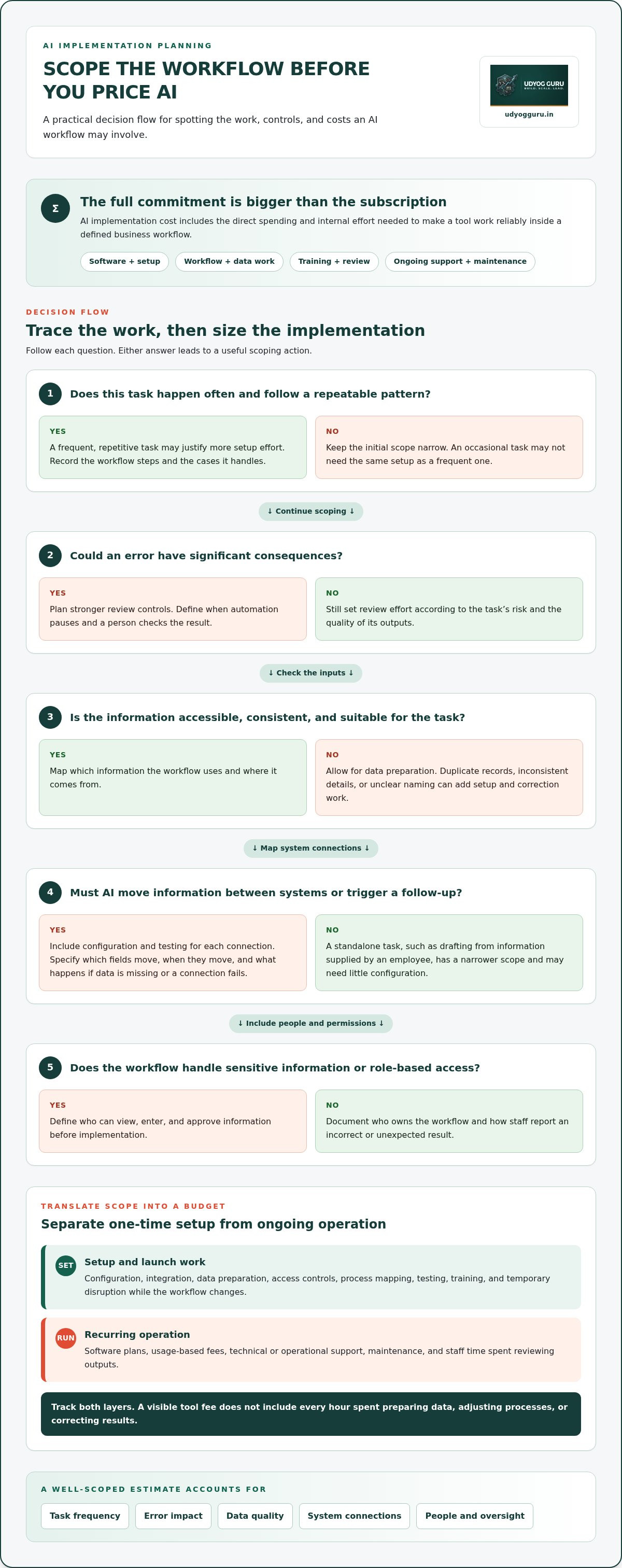
The cost of implementing AI in a small business is more than the monthly price of a tool. The full commitment can include software, setup, workflow changes, staff training, human oversight, and ongoing maintenance. Subscription fees are easy to see on an invoice. The time spent preparing data, adjusting processes, and helping employees use the system is less visible, but still part of the budget.
AI implementation cost is the total direct spending and internal effort required to make an AI tool work reliably within a defined business workflow. The scope depends on the task, the systems involved, and the controls needed to keep the output useful.
Separate the estimate into two layers:
- Direct spending: software subscriptions, usage-based charges, setup or configuration, integration work, and support.
- Internal costs: staff time for process mapping, data preparation, testing, training, review, and temporary disruption while a new workflow is introduced.
These costs interact. If an employee has to correct AI output repeatedly, the business pays in review time even if the software fee stays the same. Those corrections can also show where the workflow or inputs need improvement. This is one reason AI planning overlaps with business intelligence strategies, which use data to inform business decisions.
Which costs recur, and which happen during setup?
Recurring costs may include software plans, usage fees, and technical or operational support. Setup work is about making the tool usable in context: preparing source data, configuring access controls, connecting systems, and testing outputs against real tasks. Track setup and recurring costs separately so a low initial estimate does not obscure the continuing cost of operation.
Plan limits, user counts, usage allowances, and support terms vary by vendor and can affect the total. Review the current pricing and limits for the tool and plan you are assessing, then estimate likely usage and support needs.
Why does workflow complexity change the estimate?
A standalone drafting task using information supplied by one employee has a narrower scope than an automated workflow that reads customer details, updates a sales system, triggers a follow-up, and routes exceptions for approval. Each connection adds configuration and testing. Each approval or unusual case also needs a defined response.
Source quality matters, too. Inaccurate or inconsistent records can lead to unreliable results and more correction work. Stable, repeatable processes are easier to scope because their steps and exceptions are visible. If employees rely on memory to carry out a process, document how it works before estimating AI effort. That diagnosis gives the budget a firmer foundation than the tool price alone.
The Main AI Implementation Cost Drivers: Tools, Integration, Data, and People
The cost of implementing AI in a small business depends on more than the tool selected. Three workflow conditions help establish the likely scope: how often the task occurs, how many cases it handles, and what an error could cost in time, money, or customer trust. Automating a frequent, repetitive task may justify more setup effort than applying AI to an occasional one. A workflow where errors have significant consequences also needs stronger review controls.
Integration and human oversight can outweigh the visible tool fee when AI must move information across systems or its outputs need regular checking. A ready-made AI tool used by an employee for drafting may need little configuration. An automation that transfers information between a form, a customer database, and a follow-up process requires mapped steps, system connections, and a plan for failed or incomplete transfers.
How do data and integrations affect the implementation budget?
Start by checking whether the information needed for the task is accessible, consistent, and suitable for its intended use. Records spread across files, duplicate entries, or unclear naming conventions may need to be cleaned up before an AI workflow can use them reliably. This work affects both setup effort and the amount of human correction required later.
Every system connection adds configuration and testing: which fields move, when they move, and what happens if data is missing or a connection fails. Access controls need equal attention. If a workflow handles sensitive information or different roles have different permissions, define who can view, enter, and approve data before implementation. These controls belong in the project scope, not as optional technical polish.
What people and governance work should a small business plan for?
AI changes responsibilities as well as software. Staff need onboarding for the new process, including when to use AI, what to verify, and how to report an incorrect or unexpected result. Assign a workflow owner to monitor accuracy, access, and process changes. Document escalation steps so employees know when to pause automation and seek human review.
Set review effort according to the task’s risk and the quality of its outputs. For example, a team might check every AI-generated customer response before sending it during an initial rollout, then adjust the review method after observing performance. Include that staff time in the budget. Training and review are not temporary extras to ignore after launch. They help keep the workflow controlled as tools, data, and business needs change.
For owners who need workflow clarity before adding technical complexity, Udyog Guru’s AI integration approach for existing workflows focuses on embedding AI and technology into current operations without custom software development.
Comparing AI Implementation Approaches for a Small Business
The right approach depends on how much of the workflow needs to change, how many systems are involved, and who can own the process after launch. A ready-made AI tool may be enough for a contained task. Connecting multiple applications or changing team procedures requires more coordination. Compare the ongoing operating demands, not just the initial setup.
| Approach | Setup effort | Control and integration | Internal ownership and maintenance |
|---|---|---|---|
| Existing AI tools | Low for common, standalone tasks. | Limited configuration; often works within one application or through user input. | Staff manage prompts, review outputs, and keep usage aligned with the task. |
| No-code automation | Moderate; steps and triggers must be mapped and tested. | Links supported applications, with control shaped by available settings and plan limits. | An employee needs to monitor failed runs, changed processes, and connected accounts. |
| Guided implementation | Varies with workflow scope; includes process selection and adoption planning. | Supports fitting tools and automation to existing workflows without assuming a custom build. | Ownership, review, and staff adoption are planned as part of implementation. |
| Custom development | High; requirements, design, testing, and deployment need to be defined. | Can provide greater control for needs standard tools cannot reasonably meet. | Requires ongoing responsibility for technical changes, testing, and maintenance. |
When can existing AI tools or no-code automation be sufficient?
Existing tools can suit bounded tasks such as summarising documents, classifying enquiries, or preparing a first draft for staff review. They are easier to scope when inputs are clear, outputs are predictable, and a person can check the result before it affects a customer or business record. No-code automation may suit repeatable administrative steps across supported applications. Its limits become apparent when data access, exceptions, or system connections require substantial configuration.
When does a business need guided or custom implementation?
Guided implementation is useful when the owner needs to select a workflow, clarify its steps, and prepare the team to adopt a new process. Custom development is a separate path, best reserved for requirements that existing tools and automation cannot reasonably meet. Repetitive work with standard steps does not automatically justify a custom build.
Udyog Guru’s AI Tech Business Integration Bootcamp focuses on embedding AI and technology into existing workflows and automating repetitive tasks without custom software development. For owners who need a structured route from workflow selection to adoption, explore a structured AI integration approach.
Comparing these paths clarifies the cost of implementing AI in a small business. The suitable option is the one whose setup, integration, ownership, and maintenance match the workflow’s actual complexity.
How to Estimate AI Cost and Test Whether the Investment Is Worthwhile
Estimate value at the workflow level, not from broad productivity claims. A disciplined pilot compares the current process with the AI-assisted one using the same measurement period and assumptions. This gives you evidence to decide whether to expand, adjust, or stop, without treating projected savings as a guaranteed return.
- Select one workflow. Choose a bounded task with a clear owner, defined inputs and outputs, and a practical review step.
- Record the baseline. Track how often the task occurs, staff time per case, rework, avoidable delays, and current output quality.
- Scope the full cost. Include recurring tool or usage fees, setup and integration work, staff time, training, human review, and ongoing oversight.
- Run a controlled pilot. Apply the AI-assisted process to the selected workflow and record results consistently.
- Review the evidence. Compare results with the baseline, then decide whether to expand, revise the process, or stop.
How can an owner calculate expected value without false precision?
Start with observed workload, not an optimistic forecast. Estimate the hours potentially released by comparing current task time with the time spent using AI, including review and correction. Note changes in rework, delays, or completed cases, but do not assign a monetary value unless your business can support the calculation with its own records.
Use conservative assumptions. If only some cases are suitable for automation, count only those, and include the staff time required to check outputs and handle exceptions. Then compare the measured operational benefit with recurring fees and internal implementation effort. This helps assess whether the workflow appears worthwhile without assuming every saved hour becomes a direct cash saving.
What should a low-risk AI pilot measure?
Define the measurement rules before the pilot begins. Track completion time, output quality, errors or rework, exceptions, actual usage, and staff adoption. Keep the period and calculation method consistent with the baseline so changes reflect the workflow rather than a different measurement approach.
Set decision criteria in advance. For example, specify the required quality level, how much review the team can sustain, and what would trigger a process adjustment or a stop. If results meet those criteria, consider testing the next stage before expanding further. For a broader sequence from workflow diagnosis to measured implementation, explore Udyog Guru’s AI integration approach.
This evidence-based process makes the cost of implementing AI in a small business easier to assess. Each spending decision is tied to a defined workflow, recorded baseline, and observable result.
A Structured Next Step: Prepare Your Small Business for AI Integration
AI planning is more reliable when it starts with operations, not a shortlist of tools. Diagnose where work slows down, select one bounded use case, compare implementation approaches against that process, and define how results will be measured. This sequence helps prevent paying for software before the workflow, its exceptions, and its desired outcome are clear.
What should an owner define before beginning AI implementation?
Document how the workflow currently runs, who is responsible at each stage, where exceptions occur, and what operating result needs to improve. For example, if a team handles incoming requests, record how requests arrive, who classifies them, what information is required, and when a person must make the final decision.
Set boundaries for data access and output review, too. Identify what information the workflow needs, who is permitted to use it, and who checks AI-generated results before they are acted on. Establish baseline measures and assign an owner to monitor the process after launch. These details help determine whether a proposed tool fits the workflow or adds avoidable steps.
How can structured integration reduce avoidable implementation work?
A controlled sequence keeps decisions connected: diagnose the process, design the workflow, select an appropriate tool, test it against real tasks, and review its performance before expanding. Each stage addresses a different source of uncertainty. Process design clarifies what should happen; tool selection determines how to support it; testing reveals where human review or adjustment is needed.
Udyog Guru’s AI Tech Business Integration Bootcamp is a structured learning and integration path for owners embedding AI and modern technology into existing workflows. It focuses on automating repetitive tasks without custom software development. This approach keeps attention on improving the process with suitable technology, rather than adding technical complexity before the need is established.
The cost of implementing AI in a small business is easier to govern when the workflow, owner, data boundaries, and measures are defined before adoption. Start with a process that has a clear operational purpose, then use implementation evidence to decide the next step.
Review the AI integration support available to business owners and consider how a structured program can help clarify your next step.
Build an AI Budget Around a Workflow That Matters
The cost of implementing AI in a small business is shaped by the work behind the tool: setup, integration, data readiness, staff time, review, and maintenance. A realistic budget accounts for direct spending as well as the effort required to make AI fit the way your business operates.
A controlled path is to diagnose a workflow, choose a focused use case, compare implementation approaches, and measure a pilot against a clear baseline. This helps you assess value before expanding investment, while grounding decisions in observed results rather than assumed returns.
For owners seeking structured support, Udyog Guru’s AI Tech Business Integration Bootcamp focuses on embedding AI into existing workflows and automating repetitive tasks without custom software development. Explore Udyog Guru's structured AI integration approach to consider a practical next step for your operations.
Start with one process you understand, measure what changes, and build from evidence. A disciplined first step can give your business a clearer foundation for using AI well.
Frequently Asked Questions
How much does it cost to implement AI in a small business?
There is no reliable single figure for the cost of implementing AI in a small business without understanding the workflow, tools, data condition, integrations, and support required. Build an estimate that includes recurring software and usage fees, setup and integration effort, staff training, review controls, and maintenance. Then compare those commitments with measured operational value. Review current vendor pricing and plan limits before finalising your budget.
What costs are included in AI implementation beyond the software subscription?
AI implementation can include configuration, data preparation, connections to existing systems, staff training, testing, access controls, output review, and ongoing maintenance. Some costs recur, while others arise during setup. Internal staff time matters, even if it does not appear as a separate invoice. List each cost category against the specific workflow you are changing so subscription fees do not obscure the full operational commitment.
Is AI implementation affordable for a small business?
Affordability depends on whether the selected use case addresses a frequent, measurable task without adding disproportionate complexity. A bounded workflow using an existing tool may require less setup than one spanning several systems. Record the current process as a baseline, include staff time and oversight in your estimate, and test the change through a limited pilot. Use what you learn to decide whether expanding the scope is justified.
Can a small business implement AI without custom software development?
Yes. Existing AI tools or no-code automation can support many bounded tasks when inputs and outputs are clear. The business still needs to define the process, manage data access, review outputs, and prepare staff to use the workflow. Custom development may be relevant when existing tools cannot meet a specific requirement or integration need, but it is not a default prerequisite for adopting AI.
How do I calculate the return on investment for AI in a small business?
Record the task’s current frequency, staff time, rework, and error impact, then define what the AI-assisted process should improve. Include tool fees, implementation effort, training, and human review in the comparison. Use conservative assumptions and measure the pilot against the original baseline over a consistent period. Treat projected savings as estimates, not guaranteed results, and keep the workflow and review criteria consistent as you assess the outcome.
What is the least expensive way to start using AI in a small business?
Begin with a repetitive, lower-risk task that you can test using an existing tool, rather than committing immediately to a complex system. Define success measures and review requirements first, then account for usage limits, staff time, and data handling. The lowest subscription fee may not mean the lowest total cost if configuration, unreliable outputs, or process changes create additional work. A small, well-scoped pilot helps reveal those costs.
How long does AI implementation take for a small business?
Implementation time depends on workflow complexity, data readiness, system connections, approval steps, and staff adoption. A contained task may be simpler to test than a process involving multiple teams or applications, but there is no universal timeline. Define the pilot scope and dependencies first. Then track progress through configuration, testing, training, and review so you can manage the actual work instead of relying on a generic duration estimate.


