

What if the problem isn’t that your business lacks financial data, but that its numbers don’t lead to a decision? Learning how to build a financial command center starts with that distinction. When revenue sits in one report, cash balances in another and costs across spreadsheets, a strong sales month can still conceal weak margins or a looming cash shortfall.
You already know financial reviews matter. The challenge is turning fragmented information into a reliable operating view. A command center isn’t simply a dashboard filled with charts. It’s a decision system: the right indicators, gathered consistently, reviewed on a defined cadence and tied to action. You don’t need more metrics. You need a focused set you can interpret and use.
This guide shows you how to assemble that system step by step. You’ll identify useful indicators for cash, profitability and operating performance; establish a repeatable process for collecting and checking data; and create review routines that turn financial signals into timely operational decisions. Udyog Guru’s Financial Command Dashboard supports this broader control system, while clear metrics and disciplined review provide its foundation. The goal is a financial picture that helps you respond before a concern becomes a crisis.
Key Takeaways
- Build the command center around decisions you need to make, then choose metrics that inform them.
- Group financial measures into profitability, cash position, working capital and forecast reliability for a more complete view.
- Learn how to build a financial command center by comparing spreadsheets, existing tools and an integrated dashboard against consistency, maintenance, access and usefulness.
- Use a phased setup process to map data sources, define and validate measures, and begin with a focused minimum viable view.
- Assign clear data ownership and document review actions so the command center supports ongoing financial control.
What a Financial Command Center Does for a Business
A business can have accounting reports, bank statements, sales records and expense spreadsheets without a clear view of its financial health. The issue isn’t simply that information is spread across tools. Each source may use different timing, categories or levels of detail, making it difficult to see how the parts fit together. Sales may be rising while customer payments arrive slowly, costs reduce margins, or upcoming obligations put pressure on available cash.
A financial command center creates a repeatable system for bringing relevant information together, interpreting what it signals and connecting that signal to a decision. It can use existing reports and tools; its defining feature is the operating discipline around them. A revenue chart is useful, but the system must also help explain whether revenue is profitable, whether it has converted into cash and what action is appropriate when results diverge from expectations.
Financial visibility shows what the numbers say; financial control assigns who interprets them, what action follows and when that action is reviewed. This distinction is central to how to build a financial command center. The design draws on Business Intelligence (BI) principles, using data to support analysis and decisions rather than treating presentation as the final objective.
Fragmented records can hide pressure in different ways. A profit report may show a healthy period while unpaid invoices delay cash collection. A stable cash balance may mask rising costs or declining margins. If leaders see only completed-period results, they may discover an operational problem after it has affected performance. The command center should therefore separate historical outcomes, the current financial position and forward-looking expectations, then show how they relate.
Which financial questions should it answer?
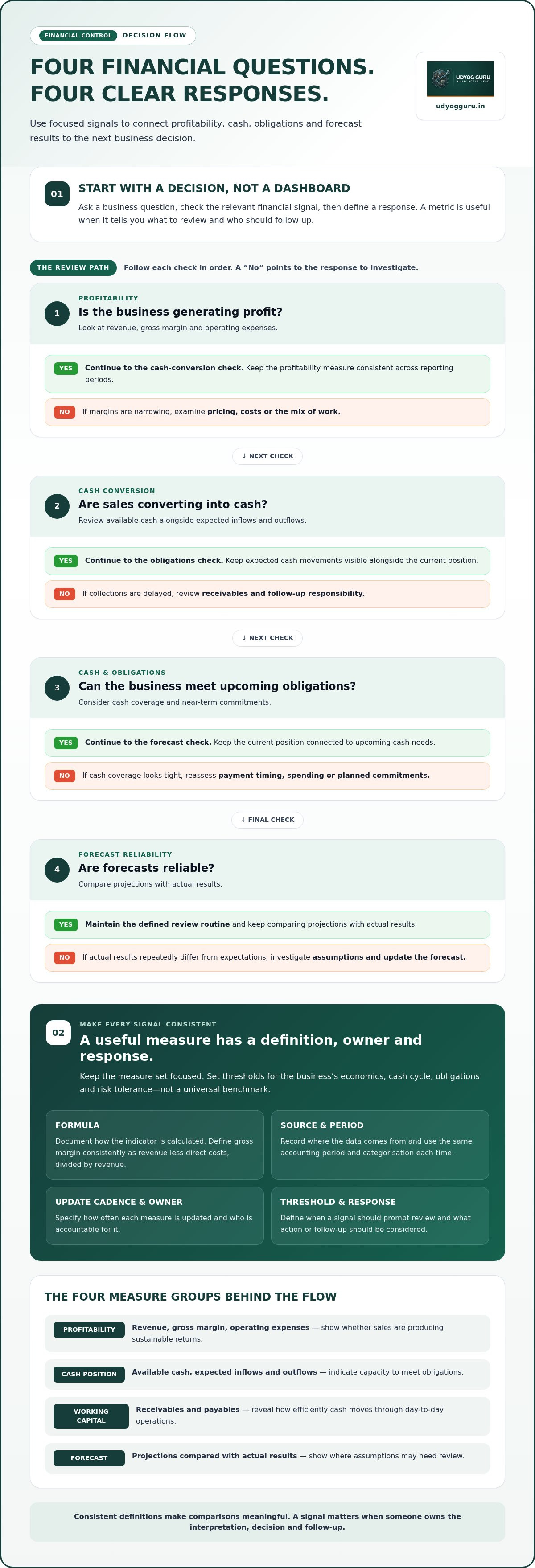
Start with questions that lead to an owner decision, not a list of available figures. For example:
- Is the business generating profit? If margins are narrowing, examine pricing, costs or the mix of work.
- Are sales converting into cash? If collections are delayed, review receivables and follow-up responsibility.
- Can the business meet upcoming obligations? If cash coverage looks tight, reassess payment timing, spending or planned commitments.
- Are forecasts reliable? If actual results repeatedly differ from expectations, investigate assumptions and update the forecast.
Define a reporting period and next step for each question. Otherwise, the metric reports a condition without guiding a response.
Who uses the financial command center?
The founder or owner needs a concise view for decisions about spending, hiring, pricing and priorities. Finance staff, where present, maintain definitions and prepare dependable reporting; operations leads explain the activity behind variances and carry out agreed actions. In a smaller business, one person may hold several responsibilities. As reporting capacity grows, analysis can be distributed, but accountability still needs to be explicit.
Assign an owner to each metric, identify who can make the related decision and record who follows up. Review depth can vary with business size and the reliability of available data, but the core definitions should remain consistent. Without clear decision rights and metric ownership, the command center risks becoming another report that people view without acting on.
Design the Financial Command Center Around Decisions and Metrics
Design the information architecture around the decisions leaders need to make, not just the reports already available. A pricing decision may require revenue and gross margin by product or service; a decision about commitments may require cash position and near-term obligations. Keep the view focused: define the question, identify the evidence needed, then determine how to present it.
Group measures into four useful areas:
- Profitability: revenue, gross margin and operating expenses show whether sales are producing sustainable returns.
- Cash position: available cash and expected inflows and outflows indicate capacity to meet obligations.
- Working capital: receivables and payables reveal how efficiently cash moves through day-to-day operations.
- Forecast reliability: comparisons between projections and actual results show where assumptions need review.
Keep the measure set compact. For each indicator, document its formula, source, update cadence, accountable owner and response threshold. For example, define gross margin consistently as revenue less direct costs, divided by revenue, and specify which costs count as direct. Record revenue in the business’s reporting currency, such as ₹, and use the same accounting period and categorisation each time. Consistent definitions make comparisons meaningful; changing a formula between periods can create a false signal.
Set thresholds according to the business’s economics, cash cycle, obligations and risk tolerance, rather than relying on a universal benchmark. A variance can prompt investigation without automatically prescribing a response. For practical ideas on using timely information to understand margins, see real-time business profitability tracking.
Select measures that lead to action
Ask what someone will do if a metric moves outside its expected range. A change in receivables may trigger a review of overdue invoices; a margin shift may call for analysis by offering or cost category. If no decision or follow-up is attached, the metric may not belong in the executive view. Every displayed metric needs an owner and a decision use, or it adds visual noise rather than financial control.
Map financial data from source to decision
Trace each indicator to its originating records: transactions, accounting entries, payroll information and sales activity. Before a figure reaches an executive view, check that periods align, categories are mapped consistently, duplicate or missing entries are addressed, and totals reconcile with the relevant source records. Separate the raw record, the calculated measure and management’s interpretation so an estimate or judgement isn’t mistaken for a transaction.
Once this data path is defined, a dashboard can present the agreed measures as part of the broader control process. Udyog Guru’s Financial Command Dashboard supports financial visibility within that system. Metric definitions, data ownership and review discipline remain essential. Businesses formalising this structure can explore Udyog Guru’s financial command system as part of a wider operating system.
Compare Practical Ways to Build a Financial Command Center
The right starting point depends on the systems already in use, the consistency of their data and the capacity available to maintain reporting. A spreadsheet may be sufficient for a focused, low-volume view; existing accounting and reporting tools may cover recurring financial checks; an integrated dashboard approach can bring cross-functional information into a more consistent leadership view. None is automatically superior. Compare each against the work it must support.
| Approach | Data consistency | Maintenance and access | Decision usefulness |
|---|---|---|---|
| Spreadsheets | Depends on controlled inputs and stable definitions | Manual updates; access and versions need active management | Useful for a small, clearly scoped set of questions |
| Existing accounting and reporting tools | Can provide consistent views of data held within those systems | Requires configuration, upkeep and defined access | Useful for routine finance reporting; cross-functional context may need additional assembly |
| Integrated dashboard approach | Designed to bring selected sources into a shared view; mapping and validation remain necessary | Requires setup and ongoing ownership of data flows and definitions | Useful when leaders need recurring views across financial and operational areas |
When a spreadsheet-based setup is sufficient
A spreadsheet can be a sound starting point when the data volume is manageable, a clear owner maintains it and only a limited number of people need the same view. Document formulas, source files, reporting periods and update responsibility. Control versions and access deliberately, then check formulas after changes. The setup is reaching its limit when teams rely on conflicting copies, manual consolidation delays reviews or errors can’t be traced quickly.
When existing tools or integration fit better
Accounting and reporting tools may already support reliable views of transactions and period results. Their limits can become apparent when owners need to connect those figures with sales, payroll or operating information held elsewhere. An integrated dashboard approach may suit recurring cross-functional reviews, but it requires an initial effort to map sources and align definitions, followed by ongoing data and process oversight. Integration doesn’t remove the need for validation.
Compare the implementation effort with the recurring work of manual consolidation: how often information is gathered, how many hand-offs are involved and how much reconciliation each review requires. Business process systematization offers a related perspective on designing repeatable operating processes around information and responsibility.
To decide how to build a financial command center, assess each option against the same practical criteria: whether figures remain consistent across periods, who maintains them, how access is controlled and whether leaders can use the resulting view to decide or act. Start with the simplest approach that meets those requirements. Move toward integration when fragmented files or repeated manual assembly obstruct timely, dependable review.
Build the Command Center in Phases and Put It Into Use
Build a reliable command center in sequence: establish which decisions it must support, trace the information behind those decisions, then test the measures before presenting them. This keeps the first version focused and makes it easier to detect weak data or unclear ownership before they influence management choices. Use this practical sequence:
- Diagnose the questions. Identify the financial decisions leaders need to make and the signals that would inform each one.
- Map the sources. Record where relevant information originates, who maintains it and how it moves into reporting.
- Define the metrics. Document each measure’s formula, reporting period, owner and response threshold.
- Validate the data. Check definitions, completeness, timing and reconciliation before interpreting trends.
- Configure a minimum viable view. Present only the measures needed for the initial decisions, with clear labels and reporting periods.
- Review and expand deliberately. Test the view in a recurring review, then add detail only when a real decision requires it.
Validate definitions and sources before relying on visual summaries. A polished chart can make inconsistent or incomplete data look authoritative. Validation establishes whether the signal is fit for interpretation. This principle is central to how to build a financial command center that supports decisions rather than simply displaying figures.
Establish a reliable financial data baseline
Document the reporting period, cut-off rules, source systems and reconciliation responsibilities before comparing results. Label actuals, forecasts and cash records distinctly so an estimate isn’t mistaken for a completed transaction or a current balance. Keep a record of missing inputs and material inconsistencies, including who will resolve them. Interpret a trend only after checking that the underlying records are consistent enough across the periods being compared.
Set a recurring review and response protocol
Define who attends each review, which measures they examine and which decisions can be made there. For each material variance, record the observed difference, likely cause, action owner and next review date. This creates a traceable loop from signal to response. Keep the protocol proportionate to reporting capacity: a smaller team can use a concise review and action log, while broader teams may need clearer hand-offs between finance and operations.
With this operating sequence in place, Udyog Guru’s Financial Command Dashboard can form part of the broader system for financial visibility. Use the dashboard within a structured approach to reviewing business finances and putting financial information to work.
Maintain Financial Control and Choose the Right Implementation Support
A command center needs operating discipline after its initial setup. Metrics can lose meaning as processes change, data can arrive late, and corrective actions can stall without a clear owner. Treat the system as a maintained control mechanism: review its definitions, check the quality of its inputs and track whether agreed actions are completed.
A dashboard alone won’t resolve unclear accountability. If nobody owns a source, an unexplained variance or a decision prompted by the data, the display may be accurate yet still fail to guide the business. The practical test is whether each review connects a trustworthy signal to an authorised decision and a documented follow-up. That’s how to build a financial command center that remains useful beyond launch.
Prevent dashboard drift and reporting confusion
Review metric definitions when business processes, reporting needs or organisational structure change. Monitor for late inputs, unexplained variances and measures that no longer inform a decision. When a definition or source changes, record what changed, when it took effect and how it affects comparisons with earlier periods. That change log helps owners distinguish a real movement in performance from a change in how it was measured.
Use a regular governance check to identify whether:
- Source data is arriving on the agreed schedule and gaps have an owner.
- Metric formulas and reporting periods still match their documented definitions.
- Significant variances have an explanation, an action owner and a follow-up point.
- Displayed measures still support a decision, rather than adding reporting noise.
Retire or revise measures that no longer serve a clear purpose. Keep the underlying change record so historical results remain interpretable.
Move from financial diagnosis to implementation
Match support to the problem. If the business needs a structured view of its current systems and issues, Business X-Ray™ provides a diagnostic. If the priority is putting improvements into operation, Business Acceleration Engine™ is an implementation system. Udyog Guru’s Financial Command Dashboard supports financial visibility as part of a broader financial control system; it works alongside clear metrics, ownership and review routines.
Before selecting support, define the decisions the command center must inform, the data sources involved, the gaps that need resolution and the responsibilities required to maintain the process. These requirements give implementation a clear scope and help distinguish a diagnostic need from an execution or technology-integration need.
With those requirements defined, explore Udyog Guru’s business systems for structured support with financial visibility and implementation. The objective isn’t to install a display and assume control will follow. It’s to connect reliable information, accountable owners and repeatable decisions in one operating system.
Put Financial Visibility to Work
Make financial visibility part of how the business operates, not a report produced only when a concern appears. Start with one recurring decision, establish the information needed to make it, and build a review habit around the result. As the business changes, refine the system so it continues to support the decisions in front of you.
Understanding how to build a financial command center is ultimately about creating a dependable link between information and action. Udyog Guru’s Financial Command Dashboard, Business X-Ray™ diagnostic system and Business Acceleration Engine™ implementation system support different stages of that work.
Explore Udyog Guru’s financial control systems and identify a practical next step for your business. A clear, repeatable financial process is within reach, and each disciplined review can strengthen the decisions that shape what comes next.
Frequently Asked Questions
What should a financial command center include?
It should include the information leaders need to assess financial condition and decide what to do next. A practical starting view might show revenue trends, gross margin, operating expenses, cash available, overdue customer invoices and upcoming supplier payments. Include reporting periods and brief notes explaining unusual movements, such as a one-off expense. Keep detailed transaction records accessible for investigation rather than crowding the main view with every line item.
How many financial metrics should a small business track?
There’s no universal number. Track enough to answer the business’s current decisions without making reviews unwieldy. Start by listing the questions owners face, then include only measures that provide evidence for those questions. For example, a business deciding whether to extend customer payment terms may need to monitor collection timing alongside cash availability. If a metric is repeatedly ignored or prompts no follow-up, reconsider whether it belongs in the core view.
Can I build a financial command center using spreadsheets?
Yes. Spreadsheets can work as an initial structure if someone maintains the inputs, formulas and access permissions. To reduce avoidable errors, protect formula cells, use a standard file-naming convention and keep a dated record of updates. If staff are copying figures into separate files, reconcile those copies before a review. To build a financial command center in a spreadsheet, start with a clear reporting period and a small set of decision-linked measures.
How often should a business review its financial command center?
Set the review rhythm according to how quickly financial conditions can affect decisions and how often reliable data is available. A business managing tight cash timing may need to check key balances and expected payments more frequently than it reviews completed-period profitability. Use a scheduled management review for broader analysis, and define who can escalate an unexpected change between meetings. The routine should be regular enough to prompt timely action but realistic for the team to maintain.
What is the difference between a financial dashboard and a financial command center?
A financial dashboard presents selected information; a command center adds the operating rules that make the information actionable. For instance, a dashboard might display a rise in overdue invoices. A command center also clarifies who investigates the cause, what response is authorised and how the result will be checked. A dashboard can be one component of the larger system, but the display alone doesn’t establish ownership or follow-through.
Do I need accounting software to build a financial command center?
No particular software is required to define the system, but dependable financial records are essential. A business can begin with available records and a controlled spreadsheet, provided entries can be traced and reconciled. Accounting software may make organised transaction records easier to maintain, but it doesn’t automatically establish useful management measures or review responsibilities. Choose tools based on the records and decisions they need to support, rather than assuming a platform creates financial control by itself.
How can a financial command center help identify cash flow problems?
It can expose timing gaps by comparing expected receipts with upcoming payments and obligations. For example, projected sales may look strong while a concentration of customer invoices is past due and supplier payments are approaching. Reviewing those dates alongside cash available can flag a potential shortfall early enough to investigate collections, spending timing or other operational responses. The view is only as dependable as the assumptions and transaction updates behind its cash expectations.


