

What if the safest way to modernise your business is to change less at first? Tech integration for traditional business works best when it strengthens proven workflows rather than adding disconnected tools. If records sit in paper files, spreadsheets, and separate software, another platform can increase duplication instead of improving control.
It’s reasonable to worry that new technology could interrupt the work that keeps orders moving, customers served, and finances managed. Start by diagnosing the workflow before choosing a tool. Identify where information is entered more than once, handoffs stall, or managers lack visibility, then define what improvement should look like. Technology decisions are more practical when they address a specific operating problem.
This guide explains how to assess workflows, connect existing tools and business data, introduce technology with limited disruption, and measure its effect on operations. It also covers how Udyog Guru’s Business X-Ray™ supports operational diagnosis and how the AI Tech Business Integration Bootcamp helps owners embed technology and automation into existing workflows without custom software development.
Key Takeaways
- Distinguish digitising a task from connecting information across a business process, so technology supports a defined operating outcome.
- Trace how a business event moves from its source record through staff actions to its final outcome. Compatible systems may exchange information through APIs.
- Compare connecting existing tools, adopting an integrated platform, or replacing fragmented systems against workflow fit, data compatibility, staff capability, security, and maintenance needs.
- Use a staged plan for tech integration for traditional business: diagnose, prioritise, map, select, pilot, train, measure, and refine, starting with one high-friction workflow.
- Identify operational gaps before choosing an implementation priority, then assess whether the connected workflow improves visibility and reduces friction.
Tech Integration for Traditional Businesses: What It Means in Practice
Tech integration is the coordinated use of tools, information, and workflows to achieve a defined business outcome, not simply the purchase of new software. A business can digitise several activities and still leave each one operating in isolation. A spreadsheet, accounting application, and messaging platform may all be digital, but if staff repeatedly transfer the same details between them, the process remains fragmented.
Consider an enquiry that becomes a sale. Staff record the enquiry, confirm the order, prepare fulfilment, update stock, issue an invoice, and follow up with the customer. Integration connects the relevant information and next steps across that sequence, so each person can see what has happened and what needs to happen next. The method can vary. As a foundation, system integration means bringing separate components together so they work as a coordinated whole.
How is technology integration different from digitization?
Digitisation converts a paper record or manual task into digital form, such as entering a paper order into a spreadsheet. Integration enables systems and teams to share relevant information across the workflow. If the spreadsheet doesn’t pass order details to fulfilment or invoicing, the digital record may simply become another stop in the handoff. The practical test is whether information moves reliably between steps, not whether a task now happens on a screen.
Which traditional business workflows reveal the need for integration?
Look for processes where records are split between paper files, spreadsheets, messaging, and separate applications. Enquiries may be logged in one place, order changes sent through messages, stock adjusted elsewhere, and invoices prepared from manually re-entered details. Customer follow-up may depend on someone remembering which step is incomplete.
These gaps make it difficult to see where work is waiting, who owns the next action, or whether the process is complete. Map one workflow from its first record to its final outcome. Note repeated entry, delays, missing information, and exceptions. A broader business diagnostic scan can help show how workflow gaps connect to wider operational visibility. This gives owners a practical basis for deciding what needs to connect before choosing technology.
How Integrated Business Technology Connects Data, Tasks, and Teams
Follow one order from creation to payment to see how integration works. The order record begins in the system where staff capture the customer, items, quantities, and agreed terms. It becomes the reference for the next person, such as a fulfilment team member checking availability and preparing dispatch. When the order reaches its defined status, the relevant details can support invoicing. Finance records payment, and the business can review the completed transaction.
Useful integration depends on reliable data, clear ownership, and defined handoffs between each workflow step. An application programming interface (API) is one way compatible systems can exchange selected information, such as an order number or status, without staff re-entering it. Cloud platforms, customer relationship management (CRM) tools, accounting applications, and workflow automation may all be useful when they fit the process. They don’t all need to be connected, and a cloud platform alone doesn’t create integration. Specify which system holds each record and who acts on it next.
What happens to business data as it moves between systems?
Map where information originates, which record is authoritative, and who uses it next. For an order, this may mean defining one consistent order number, customer name, item code, and status across the relevant tools. Set permissions so staff can access the information their roles require, and assign responsibility for correcting errors. These steps help prevent conflicting versions, such as a changed quantity in a message that never reaches the invoice record.
Where can automation support connected workflows?
Once handoffs are clear, automation can handle repeatable triggers: update an order status, remind an owner about an overdue approval, route a routine request, or prepare a regular report. Use rules for predictable actions, but retain human judgement for exceptions, customer context, or decisions with material consequences. Automation should follow a stable process. Otherwise, it can reproduce errors faster or hide where a workflow is failing.
For tech integration for traditional business, the practical test is whether the right information reaches the next person accurately and on time, with exceptions visible rather than buried. Clarify fields, ownership, and handoff rules before connecting tools. Owners looking to apply technology and automation to existing workflows can explore the AI Tech Business Integration Bootcamp as a structured learning pathway.
Choose the Right Technology Integration: Fit, Risk, and Trade-Offs
The right approach depends on where the current operating model breaks down, not on which tool is newest. For tech integration for traditional business, owners can connect suitable systems, consolidate overlapping tools, or replace a core system that blocks essential work. Integration can start with tools already in use. It doesn’t automatically require custom software. First consider whether existing tools can support the workflow reliably.
| Approach | When it may fit | Trade-offs and implementation considerations |
|---|---|---|
| Connect current tools | Existing systems meet business needs, and compatible options can exchange the required data. | Preserves familiar routines, but depends on reliable data, clear ownership, and maintainable connections. Test how changes and errors move between systems. |
| Consolidate tools | Overlapping applications or records create unnecessary complexity. | Can simplify access and reduce duplicate records, but requires decisions about which tool becomes authoritative and how information will be migrated. |
| Replace a core system | A central tool cannot support an essential workflow or creates persistent operational constraints. | May address a structural limitation, but introduces transition, training, data transfer, and continuity risks. Plan the change around business-critical work. |
Should a traditional business connect, replace, or consolidate its tools?
Connect tools when they do their jobs and can share accurate information. Consolidate when several tools perform overlapping functions or maintain competing records. Consider replacement when a core system prevents a necessary workflow from operating as required. Compare each option against the workflow’s requirements, data compatibility, employee capability, security controls, and ongoing maintenance needs.
How should owners assess risk before selecting technology?
Review who can access business information, how backups are handled, what support technology vendors provide, and what must continue during a disruption or transition. Consider the effect on employees too. Familiar routines may change, and teams need time and instruction to adopt new steps. A technically capable system can still fail operationally if ownership and training are unclear.
Set a baseline before changing the process. Record its current steps, time spent, delays, repeated entry, errors, and unresolved work using measures the business can track consistently. After a pilot or rollout, compare those same measures. This helps owners assess whether the chosen approach improved the workflow without relying on assumed savings or broad claims.
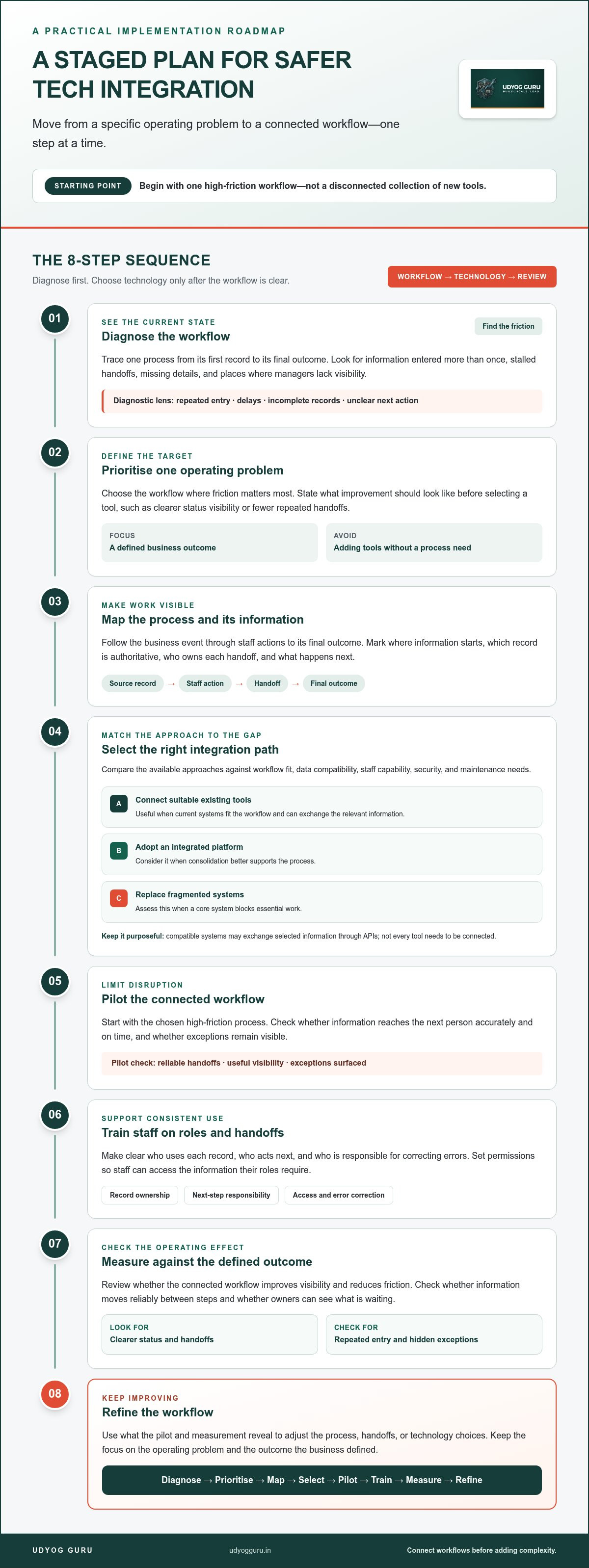
A Staged Technology Integration Plan That Protects Daily Operations
For tech integration for traditional business, a controlled rollout is safer than changing several workflows at once. Start with one high-friction process and document its current steps, responsible roles, delays, repeated tasks, and exceptions. This creates a baseline and reveals the requirements technology must support. Clear process documentation also underpins business process systematisation.
- Diagnose: Examine where work stalls, information gets re-entered, or ownership becomes unclear.
- Prioritise: Select one workflow where the problem is observable and a change can be tested without redesigning the whole operation.
- Map: Record each step, role, information input, handoff, delay, and exception. Identify who owns the process and its data.
- Select: Choose an approach that fits the workflow, existing tools, staff capability, access controls, and maintenance requirements.
- Pilot: Define the pilot’s users and boundaries. Test routine cases and exceptions before extending the changed process to other teams.
- Train: Show staff the revised steps, responsibilities, and escalation path. Keep instructions accessible during adoption.
- Measure: Compare results with the baseline, including process time, duplicate entry, unresolved exceptions, and completion accuracy.
- Refine: Review staff feedback, customer impact, and technical reliability. Correct friction before expanding the workflow.
How can a business pilot integration without disrupting service?
Choose a contained process with defined users, start and end points, and a measurable baseline. Before changing live work, assign an owner, define who can access relevant data, and document what staff should do if a system or connection fails. Keep a workable fallback procedure available while the team learns the revised process. Test standard transactions and less common cases, then expand only when the workflow performs consistently.
Which measures show whether integration is working?
Use the same measures before and after the pilot: time to complete the process, repeated data entry, open exceptions, and accuracy at completion. Also track staff adoption, customer-facing delays or errors, and system reliability, so a faster process doesn’t conceal a decline in service. Set review intervals in advance, assign someone to examine the results, and adjust the workflow when the evidence identifies a new bottleneck.
Diagnosis before implementation helps owners connect technology to real operating needs. Udyog Guru’s AI Tech Business Integration Bootcamp provides a structured way to apply technology and automation to existing workflows. Explore the AI Tech Business Integration Bootcamp.
Build a Connected Operating System with Structured Integration Support
Technology integration is more reliable when treated as part of the operating system, not as a collection of isolated tool choices. The progression is deliberate: diagnose operational gaps, design the workflow, select and connect suitable tools, support staff adoption, then measure whether the process performs better. This gives owners a reason for each implementation decision and a way to evaluate its effect.
When does a business need diagnosis before adding more technology?
Recurring workarounds, unclear accountability, and business information scattered across different records can signal that the underlying process needs examination before another tool is added. Business X-Ray™ is a diagnostic system for identifying operational gaps. It helps owners see where a process loses continuity and determine an implementation priority. That wider view matters because a workflow may depend on staff responsibilities as much as software.
Workforce processes and financial visibility are part of the same operating picture. If responsibilities are unclear, a connected system may make a handoff harder to interpret. If financial information is delayed or fragmented, owners may struggle to assess the operational effect of a change. A structured diagnosis helps connect these dimensions before technology choices are made.
How can owners turn an integration plan into implementation?
After diagnosis, the Business Acceleration Engine™ provides a structured system for implementing business improvements. Owners can approach technology adoption as a practical workflow change: define the process, clarify roles, connect relevant information, prepare staff, and review performance. The AI Tech Business Integration Bootcamp focuses on embedding technology and automation into existing workflows, with an emphasis on improving efficiency and automating repetitive tasks without custom software development.
This is the operating principle behind effective tech integration for traditional business: preserve what works, address points of friction, and connect systems where the workflow benefits. The Financial Command Dashboard supports operational visibility and financial control, while workforce systems help clarify how tasks move between people. Together, these elements can contribute to a more coherent operating model, with measurement guiding further refinement rather than prompting change for its own sake.
Owners ready to develop a more connected and measurable approach to business improvement can explore Udyog Guru’s business transformation programs.
Make Your Next Technology Decision With Clarity
Effective tech integration for traditional business starts with the workflow, not the tool. Identify where information, responsibilities, or handoffs break down, then choose an approach that fits the process and the people who run it. A staged rollout, measured against a clear baseline, helps protect daily operations while showing whether the change is working.
Business X-Ray™ provides a structured approach to identifying operational gaps before you set an implementation priority. From there, the AI Tech Business Integration Bootcamp focuses on applying technology and automation within existing workflows, without custom software development. The goal is a more connected operation, built through deliberate diagnosis, adoption, and measurement.
Explore Udyog Guru’s structured business transformation programs to find a practical path from operational insight to improvement. Start with one workflow, make its needs visible, and build from there with confidence.
Frequently Asked Questions
What does technology integration mean for a traditional business?
Technology integration connects tools, business information, and team responsibilities to support a defined workflow or outcome. For example, an enquiry can move from initial recording to sales action, fulfilment, invoicing, and follow-up without staff repeatedly re-entering the same details. Tech integration for traditional business is more than digitising records or buying software. The key test is whether relevant information reaches the right person at the right step.
How can a small traditional business start integrating technology?
Start by examining one process that causes repeated work, delays, or confusion, rather than attempting a business-wide technology change. Write down its current steps, who handles each handoff, where information is stored, and how long the process takes. Then identify a practical improvement and assess whether existing tools can support it. Business X-Ray™ offers a structured approach to identifying operational gaps before an owner chooses an implementation priority.
Does technology integration require custom software?
No. A business can often begin by clarifying its processes and connecting or consolidating tools that already meet its needs. Compatible systems may exchange information through available integrations or APIs, while some workflows may need only clearer ownership and consistent records. Udyog Guru’s AI Tech Business Integration Bootcamp focuses on embedding technology and automation into existing workflows, with an emphasis on operational improvement without custom software development.
Which business processes should be integrated first?
Prioritise a workflow where delays, repeated data entry, unclear ownership, or missing information create a visible operational problem. Examples include enquiry handling, order processing, stock updates, invoicing, and customer follow-up. Choose a process with clear boundaries and an outcome you can measure. Map its current steps and exceptions first, then compare potential improvements against their effect on daily work, customer service, and the reliability of business records.
How can a business integrate technology without disrupting daily operations?
Use a contained pilot before extending a change across the business. Define which staff and tasks are included, assign an owner, and establish a baseline for the current process. Prepare staff with clear instructions and access controls, and document fallback steps in case the new workflow cannot be used. Test routine situations as well as exceptions, monitor the effect on customers and employees, and expand only after the process works reliably.
How do you measure whether technology integration is successful?
Set a baseline before implementation and review the same indicators afterward. Useful measures include time to complete a process, repeated data entry, unresolved exceptions, and accuracy at completion. Also track staff adoption, customer-facing delays or errors, and technical reliability. Compare results at planned review intervals, and investigate any measure that worsens. Success means the connected workflow improves the intended operation without creating new friction elsewhere.
Can AI be part of technology integration in a traditional business?
Yes. AI can support suitable workflows, particularly where repetitive tasks or document handling consume staff time, but it should be introduced to address a defined business need. First establish reliable information, clear process rules, and a person responsible for reviewing outputs. Keep human judgement involved where decisions require customer context, exception handling, or accountability. The AI Tech Business Integration Bootcamp focuses on applying technology and automation within existing business workflows.


