

What if resistance to a new tool points to a workflow problem, not an attitude problem? Getting team buy-in for new technology starts with finding out what employees believe the change will cost them: time, confidence, control, or a reliable routine. Without that diagnosis, even a capable system can become another underused purchase.
Clear communication helps, but it won’t resolve a poor fit between the tool and the work or answer concerns about changing roles and expectations. Treat adoption as a business system change, with employee feedback built into the process rather than added after rollout.
This guide shows you how to identify causes of resistance before choosing a response, compare adoption approaches, and involve employees in testing and shaping a measured rollout. You’ll also learn how to track usage alongside operational outcomes, so implementation decisions are based on evidence rather than launch-day enthusiasm.
Key Takeaways
- Define buy-in as informed participation and sustained use, not automatic enthusiasm.
- Set a baseline and specify the operational problem, intended users, workflow changes, and trade-offs before selecting a tool.
- Compare mandate-led rollout, consultative design, and a limited pilot against your needs for speed, employee involvement, and useful feedback.
- Make getting team buy-in for new technology a sequenced process: map stakeholders, explain the reason, co-design, test, train, and review.
- Track adoption and operational outcomes against your baseline. Treat workarounds and low usage as signals to investigate workflow fit and support.
Why getting team buy-in for new technology starts with diagnosing the problem
A signed purchase order confirms that a decision was made. It doesn’t confirm that the tool fits the work, employees can use it confidently, or the new process makes operational sense. Treat adoption as a system change, not a software installation. The tool, workflow, employee roles, and support structure all affect whether it becomes part of daily operations.
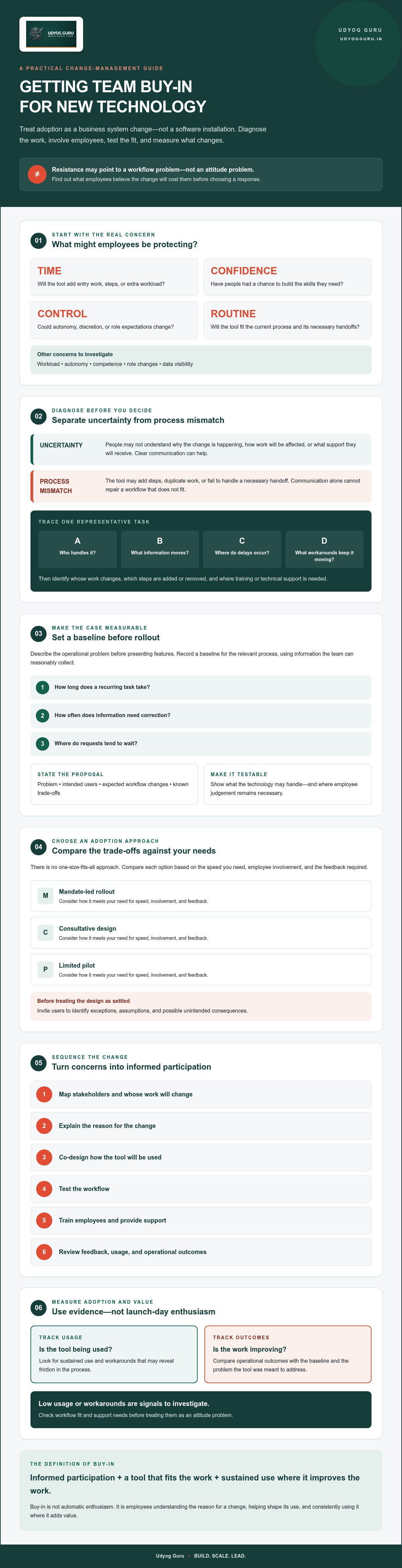
Start by separating two causes of resistance. Uncertainty can arise when people don’t understand why the change is happening, how it will affect their work, or what support they’ll receive. Process mismatch is different: the tool may add steps, duplicate existing work, or fail to handle a necessary handoff. Communication can reduce uncertainty, but it can’t repair a workflow that doesn’t fit.
Technology buy-in means employees understand the reason for a change, participate in shaping its use, and consistently use it where it improves the work.
The Technology Acceptance Model offers a useful lens for diagnosis: perceived usefulness and ease of use influence whether people accept a technology. Apply that lens to actual tasks rather than assuming a product demonstration reflects the employee experience.
What employees may be protecting when they resist a new tool
Hesitation can point to concerns about workload, autonomy, competence, role changes, or data visibility. An employee may worry that a new system creates extra entry work, reduces discretion, exposes performance details, or requires skills they haven’t had a chance to build. Ask specific questions rather than labelling people “disloyal” or “unwilling to change.”
Separate individual preference from operational risk. Disliking a new interface may be personal; repeated concerns about duplicate data entry or unclear access to information may indicate a design flaw. Ask what task becomes harder, who is affected, and what evidence would confirm the concern. That turns resistance into input for investigation.
How to diagnose whether the technology solves a real work problem
Map the current process before describing the proposed tool. Trace a representative task from start to finish, noting who handles it, what information moves between people or systems, where delays occur, and which workarounds keep it moving. Then identify whose work will change, what steps will be added or removed, and where training or technical support is needed.
Compare the proposed workflow with this baseline. If the tool addresses a documented bottleneck without creating a larger burden elsewhere, the case for testing is clearer. If the mismatch remains unresolved, pause and investigate rather than asking employees to compensate manually. For a broader method of documenting workflows and clarifying operational roles, see this business process systematization framework.
Build team buy-in for new technology by making the case measurable
A credible case for a new tool starts with the work it is meant to improve, not a list of features. Before rollout, record a baseline for the relevant process. For example, note how long a recurring task takes, how often information needs correction, or where requests tend to wait. Choose a measure that reflects a real operational concern and can be observed with information the team can reasonably collect.
Then state the proposal in terms employees can examine: the problem, intended users, expected workflow changes, and known trade-offs. If a tool may reduce manual entry but requires a new review step, say so. Harvard Business School’s discussion of why employees resist new tools highlights that concerns can involve professional identity and expertise, not simply reluctance to change. A clear case should explain which responsibilities may shift and which will remain with the team.
Create a technology case employees can test
Use examples from the team’s actual work, such as repeated data entry between systems or delays while a request waits for approval. Show the proposed change step by step, including what the technology may handle and what still requires employee judgement. Invite users to identify exceptions, assumptions, and possible unintended consequences before treating the design as settled. Their responses can reveal whether the case accurately describes the work.
Choose measures that distinguish use from value
Choose a small set of indicators tied to the stated problem. Depending on the workflow, these might include task completion, error rates, turnaround time, support requests, or whether intended users complete the relevant task through the new system. Compare them with the baseline and gather employee feedback about friction that numbers may not explain.
Adoption measures should track both whether people use the technology and whether the workflow improves. Logins can show access, not effective use or operational value. If AI is part of the proposed change, the AI implementation roadmap for SMEs offers further context for a structured approach.
Keep the measures as hypotheses to test, not promised results. For a business-system perspective on embedding technology into existing operations, explore Udyog Guru’s AI Tech Business Integration Bootcamp.
Compare change approaches to address the main objection: disruption without value
Employees are more likely to question a rollout when its disruption is clear but its value is uncertain. The response isn’t always to slow down or impose the change. Choose an approach based on operational risk, team readiness, and how easily the decision can be reversed. A controlled test can reveal workflow problems before a wider deployment turns them into routine friction.
| Approach | Speed | Employee involvement | Disruption | Feedback quality | Best suited to |
|---|---|---|---|---|---|
| Mandate-led rollout | High | Low unless deliberately added | Can be high if the change affects established routines | Often limited after the decision | Time-bound changes requiring consistent processes |
| Consultative design | Moderate | High | Usually managed through planning | Strong on requirements and exceptions | Workflows where frontline knowledge can shape the design |
| Limited pilot | Lower at first | High for participating users | Contained to the test group and scope | Strong on practical use and workflow fit | Changes with uncertainty that can be tested before wider adoption |
These are trade-offs, not guarantees. A directive can establish consistency quickly but may miss important process details. Consultation can improve the design but takes time to gather and resolve input. A pilot limits exposure and generates practical evidence, but its findings may not capture every team’s needs. Udyog Guru’s Workforce X-Ray™ and Workforce Acceleration Engine™ are designed to help businesses examine workforce performance and delegation.
When a directive rollout may be appropriate
A mandate may fit when a process must become consistent or leaders have made a clear, time-bound operational decision. It still needs a sound implementation structure: explain the rationale, clarify responsibilities, provide appropriate support, and establish a route for reporting problems. Be direct about what is fixed. Presenting a settled decision as open consultation damages trust when employees cannot influence the outcome.
When consultation or a pilot is the better fit
Consultation is valuable when frontline knowledge can expose exceptions or improve requirements before implementation. Use a bounded pilot when uncertainty is higher and the decision can be adjusted based on what the test reveals. Define its scope, participants, and decision criteria in advance. In getting team buy-in for new technology, employees need to know whether feedback can change the design, the rollout, or both.
Use a practical rollout sequence to turn concerns into informed participation
A rollout is easier to manage when each stage has a clear purpose, owner, and decision point. Use this sequence to turn employee concerns into evidence and practical adjustments:
- Map stakeholders: Identify affected roles, decision-makers, informal influencers, and teams that depend on the process.
- Explain the reason: State the operational problem, why change is being considered, what is decided, and what remains open to input.
- Co-design: Ask users to review the proposed workflow, flag exceptions, and clarify responsibilities.
- Test: Run a bounded pilot with named users, agreed measures, and a review point.
- Train: Practise role-specific tasks with realistic examples, not just a tour of features.
- Review: Examine adoption evidence, employee feedback, support needs, and workflow outcomes before deciding what happens next.
Assign ownership at the outset. Name who makes decisions, handles technical support, approves workflow changes, and gathers employee feedback. Clear ownership prevents questions from being passed between teams and gives employees a reliable route to raise issues.
Plan stakeholder communication and participation
Communication should distinguish what is changing from what is not. Explain the reason for the proposed change, the roles it affects, what remains undecided, and when the next update will arrive. Provide a clear channel for questions and record how feedback influences decisions. If a suggestion can’t be adopted, explain why. Silence can make participation feel performative.
Run a pilot with defined boundaries and support
A pilot is a bounded test with named users, defined measures, and clear review criteria. Specify the workflow and duration, identify a support contact, and agree what evidence will guide the decision to adjust, extend, or stop the test. During real tasks, collect feedback on friction, workarounds, errors, and training gaps. This makes the pilot useful for diagnosing the process, not merely demonstrating the tool.
Training should match each role’s responsibilities. For example, a person entering information needs practice completing that task, while a reviewer needs to understand how to check and resolve exceptions. This is more useful than a general feature presentation and helps surface support needs before wider deployment.
For organizations planning to embed AI and automation into existing operations, Udyog Guru’s AI Tech Business Integration Bootcamp focuses on structured technology integration.
Sustain technology adoption with feedback, accountability, and a clear next step
Launch is a checkpoint, not proof that a tool has become part of the work. Review adoption against the baseline and outcomes defined before rollout. Look at use across relevant roles and tasks, then compare it with process measures such as completion, errors, turnaround time, or support requests. A healthy login count means little if employees still rely on the old process to finish the job.
Diagnose adoption after launch without blaming users
Repeated workarounds, low use, and frequent support requests are diagnostic signals. Ask users where the system adds friction, duplicates work, or fails to handle an exception. Compare feedback across roles: a tool may work well for one task but create extra steps for another. Treat the pattern as evidence about the workflow, training, or system fit, not automatic proof that employees are failing to adopt it.
Assign an owner and review date to each recurring issue. Identify whether it needs a process change, additional practice, or technical investigation, and communicate what will happen next. This connects feedback to action and makes accountability part of implementation rather than a way to assign blame.
Choose the next step based on operational evidence
Use the agreed criteria to decide whether to expand, adjust, extend the pilot, pause, or stop. Expand only when the test indicates the workflow is usable and the organization can support the wider group. If usability or readiness problems remain unresolved, revise the approach before extending the change. A measured decision protects operational continuity and employee trust.
Structured business and workforce systems can help leaders examine whether roles, workflows, and accountability are ready to support technology adoption. Udyog Guru’s Business X-Ray™ and Business Acceleration Engine™ are part of its business transformation framework, while Workforce X-Ray™ and Workforce Acceleration Engine™ address workforce performance and delegation. The AI Tech Business Integration Bootcamp focuses on embedding technology and automation into core business operations.
Getting team buy-in for new technology requires continued diagnosis after rollout, not just agreement before it. Udyog Guru’s programs include business and workforce diagnostic and acceleration systems, as well as an AI Tech Business Integration Bootcamp for integrating technology into existing operations.
Make your next technology rollout evidence-led
Getting team buy-in for new technology isn’t about securing enthusiastic agreement before launch. It’s about diagnosing the work problem, explaining what will change, involving employees in design and testing, and checking whether adoption improves the process. A baseline and clear review criteria help leaders distinguish uncertainty from workflow problems and decide whether to adjust, expand, or pause a rollout.
Keep feedback active after implementation. Low use, workarounds, and support requests are signals to investigate, not automatic evidence of employee failure. When teams can raise concerns and see them addressed, adoption becomes a managed operational process rather than a one-time announcement.
With clear ownership and measured decisions, your team can move forward with greater confidence. Contact Udyog Guru to discuss whether its AI Tech Business Integration Bootcamp fits your technology integration needs.
Frequently Asked Questions
Is employee resistance to new technology always a sign that the team is not ready?
No. Resistance can signal uncertainty, insufficient training, concern about workload, or a genuine mismatch between the tool and the work. Ask employees to identify specific tasks and risks before deciding how to respond. For example, repeated manual workarounds may point to a process problem, while questions about unfamiliar features may indicate a need for practice. Investigate the cause before treating hesitation as an attitude issue.
How do you get employees to use new technology at work?
Start by explaining the operational problem and the specific work the technology is intended to improve. Involve affected employees in checking workflow assumptions, then test the change within clear boundaries and make support available. Practise real tasks, provide a route for questions, and follow up after launch. Getting team buy-in for new technology also means measuring whether the tool supports better work, not simply whether employees log in.
What is the best way to introduce new technology to a team?
There’s no single best approach for every team. Compare a directive rollout, consultative design, and a limited pilot against the change’s operational risk, reversibility, workflow impact, and team readiness. When uncertainty is high, a bounded test can reveal issues before wider adoption. Whichever approach you select, communicate what’s changing, who is responsible, what support is available, and how feedback or pilot results will inform the next decision.
How can managers overcome fear of job loss when introducing new technology?
Address the concern directly rather than dismissing it. Explain what the technology is intended to change, which responsibilities may be affected, and what remains undecided. Don’t promise that roles will never change unless that’s confirmed. Give employees a clear channel for questions and involve them in identifying how tasks and required skills may evolve. Specific, honest communication helps people distinguish known changes from unanswered questions.
How do you measure whether a team has adopted new technology successfully?
Use more than login counts or completed training. Compare relevant usage patterns with process outcomes, such as task completion, error rates, turnaround time, or support requests. Choose indicators that match the workflow, then interpret them alongside employee feedback. Getting team buy-in for new technology isn’t proof of success by itself. Define a baseline and review criteria before rollout so the evidence can guide a fair decision.
What should a technology pilot include before a full rollout?
Define the workflow being tested, participating users, pilot boundaries, support arrangements, and review period. Set criteria for assessing use and operational outcomes before the test begins. During the pilot, gather task-level feedback, record issues and workarounds, and note training needs. Assign someone to review the findings and decide whether to expand, revise, pause, or stop. A pilot should generate evidence for that decision, not just demonstrate features.
Can a new technology rollout succeed without unanimous team agreement?
Yes. Unanimous enthusiasm isn’t a reliable requirement, but employees need clear information, workable support, and a legitimate way to raise concerns. Distinguish disagreement about personal preference from evidence of operational risk. Explain who makes the final decision, how employee input was considered, and what measures will be reviewed after launch. A transparent process can support responsible implementation even when some team members remain unconvinced.


